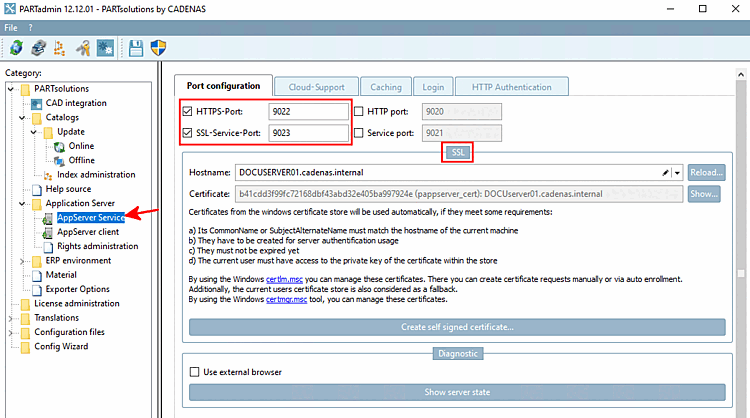
The setting options for authentication [Authentication], rights assignment [Assign rights] and rights [Rights] can be found in PARTadmin under AppServer Service. It is also important to use HTTPS / SSL for the port configuration [Port configuration] (see below).
HTTP authentication [HTTP Authentication] Tabbed page: The Mechanisms+Paths subpage defines which method and which condition can be used for authentication.
The prefix [Prefix] "
/webapps" specifies that Autologin is used when coming from web browsers embedded in PARTsolutions or PARTsolutions applications.Rights assignment [Assign rights] tab page: List of assigned users and groups or all existing users and groups in all trusted domains/forests
By default, a logged-in user can see, control and delete their own pipelines.
If you want that a certain user has extended rights, proceed as follows:
Here you can add, remove, edit and copy profiles and/or rights as required.
!["Authentication [Authentication] " tab page](https://webapi.partcommunity.com/service/help/latest/pages/jp/partwarehouse/doc/resources/img/img_e903f2659b534e96a98fbe74021348ea.png)
![[Note]](https://webapi.partcommunity.com/service/help/latest/pages/jp/partwarehouse/doc/images/note.png)
!["Rights assignment [Assign rights] " tab page (only assigned [only assigned] )](https://webapi.partcommunity.com/service/help/latest/pages/jp/partwarehouse/doc/resources/img/img_3f2b67affc6746a59beba5b7488937ca.png)
!["Rights assignment [Assign rights] " tab page (all available [all existing] )](https://webapi.partcommunity.com/service/help/latest/pages/jp/partwarehouse/doc/resources/img/img_475ee5edcbc34336a8a823444afb1a69.png)
!["Right [Rights] " tab page](https://webapi.partcommunity.com/service/help/latest/pages/jp/partwarehouse/doc/resources/img/img_2ef32d28b0344b04b8028c76eee47cf2.png)
Use HTTPS and activate SSL (HTTP authentication is cleartext).
Activate the two checkboxes HTTPS port [HTTPS-Port] and SSL service port [SSL-Service-Port] under the AppServer Service category on the Port configuration Tabbed page. A description of how to generate a self-signed certificate can be found under Section 1.4.5.9.1.6, “SSL encryption ” in ENTERPRISE 3Dfindit (Professional) - Administration.
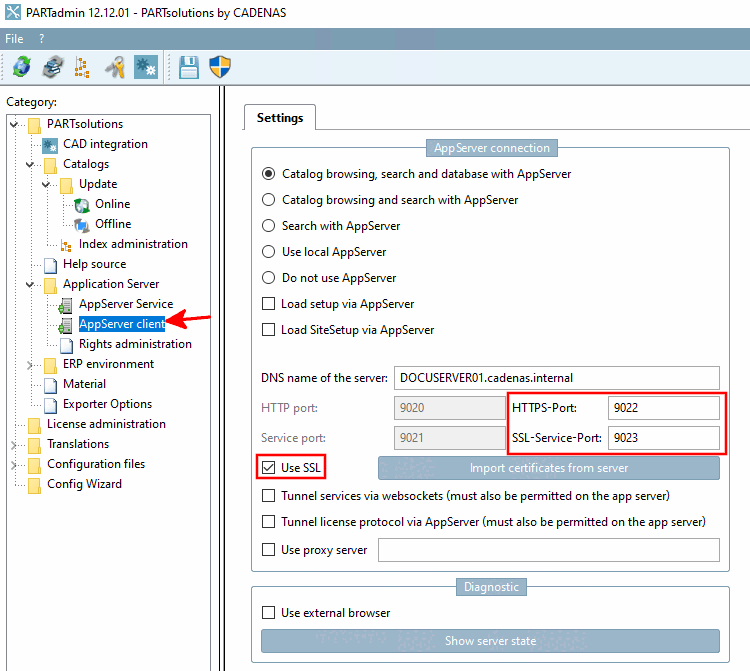
Activate the Use SSL option under the AppServer Client [AppServer client] category and import the corresponding certificate from the server. See Section 1.4.5.9.1.6, “SSL encryption ” in ENTERPRISE 3Dfindit (Professional) - Administration.