
 |
Via PARTdataManager -> Extras menu -> Duplicates Report -> Create report... you can search a selected directory with subdirectories for duplicates and receive a detailed report on this.[68]
Furthermore especially regard the possibility to send reports via e-mail. In the report itself a textual search can be used (see below).
Call up the function directly out of PARTdataManager. Either from the Extras menu or from the context menu of the desired directory.
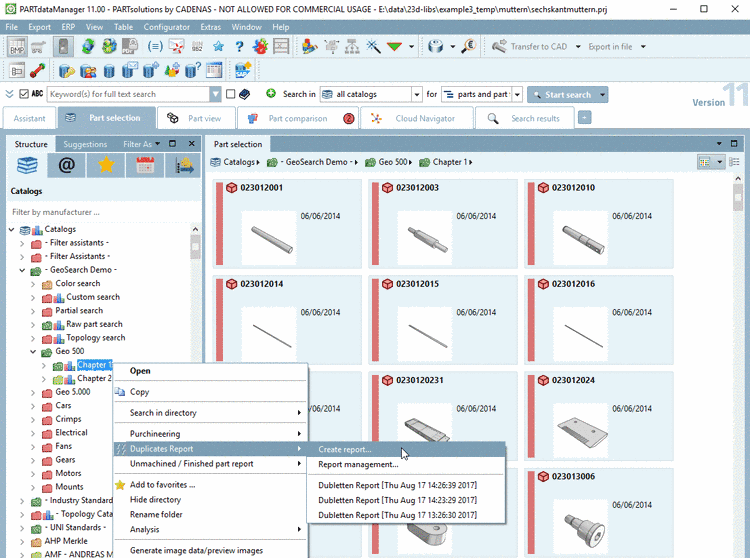
-> The Create duplicate report dialog box appears.
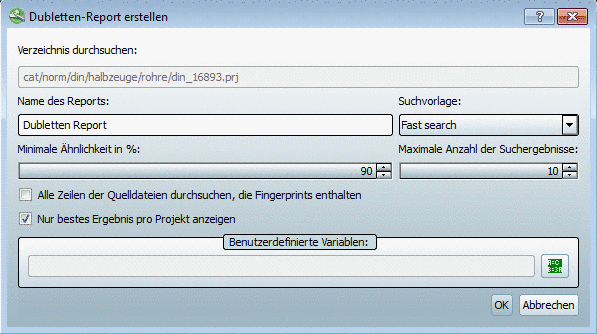
Start the report creation with .
The report has 2 different views:
[68] You can easily import your own parts to PARTsolutions. (See Import von Geometrie-Dateien.) The report can be processed on the base of SAT/STEP/IGES/STL files.