
1.7.8.2.
Tweak
menus, menu items, toolbars, buttons and context menu commands
1.7.8.2.1. Overview |  |
| Prev | Next |
All settings are made with standard configuration files under PARTadmin -> category Configuration files -> $CADENAS _Setup.
Which application is controlled by which file can be seen directly at the file name.
menustructure_<name of application>.cfg
menustructure_PARTdataManager.cfg
menustructure_PARTProject.cfg
"menustructure" configuration files define the basically structure, meaning which menus, menu items, toolbars, buttons and context menus are basically available.
Details on
menustructure_<name of
      application>.cfg
can be found at Section 1.7.8.2.2.1, “menustructure_PARTdataManager.cfg”.menuvisibility<name of application>.cfg
menuvisibility_PARTdataManager.cfg
menuvisibility_PARTProject.cfg
"menuvisibility" configuration files define the visibility of UI elements.
The file is divided into blocks which represent certain modes (Beginner [Beginner], Professional or role-dependent modes [for ERP integration]).
Each mode contains a list of keys representing single functions/UI-elements (represented in menus, toolbars or context menus).
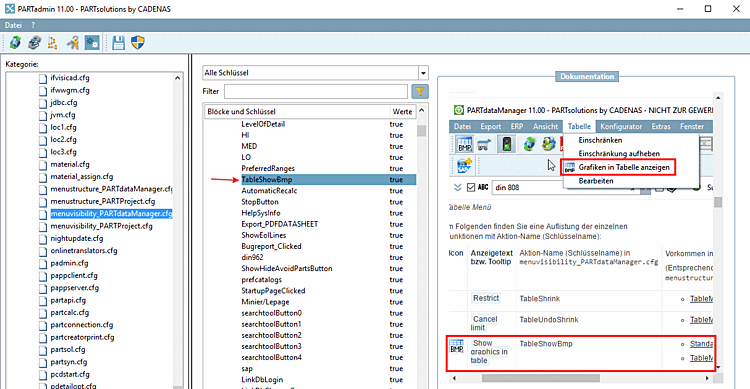
The key value can be true (element visible) or false (element hidden). Simply set the key value as required. If you click through the keys, the corresponding illustrations of the user interface are displayed on the right-hand side in the Documentation dialog area so that you can immediately establish the relationship between the function element and the configuration setting.
Details on this can be found under Section 1.7.8.2.2.2, “menuvisibility_PARTdataManager.cfg”.
![[Note]](https://webapi.partcommunity.com/service/help/latest/pages/jp/partwarehouse/doc/images/note.png)
![[Tip]](https://webapi.partcommunity.com/service/help/latest/pages/jp/partwarehouse/doc/images/tip.png) | Tip |
|---|---|
Please also read the general information under User interface at a glance and Full text search. | |