

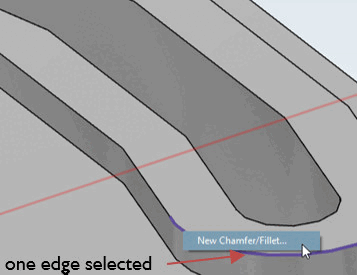
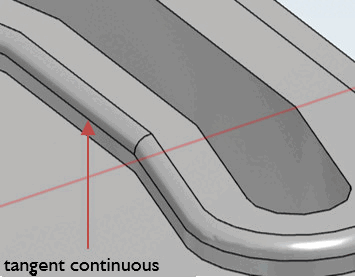
If consecutive edges are connected with an angle < 15 degrees, you only need to select a single edge to apply the function Create new chamfer/rounding. [New Chamfer/Fillet...].. function to all subsequent edges as well.
![[Note]](https://webapi.partcommunity.com/service/help/latest/pages/jp/partwarehouse/doc/images/note.png) | Note |
|---|---|
Tangent continuous may cause unwanted blends. In this case the blend has to be created earlier or by sketch. | |
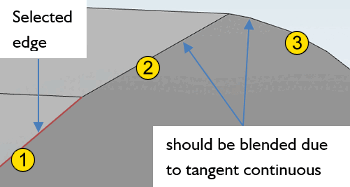
For angles larger than 15 degree the tangent continuous does not take effect.
In following
example the first edge after the selected one is blended
 , the second one not
  (see figure under b), because the transition
angle is larger than 15 degree.
(see figure under b), because the transition
angle is larger than 15 degree.
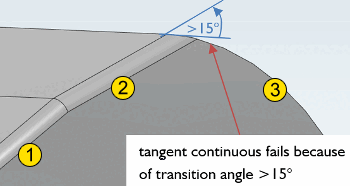
Curves are never actually mapped in eCATALOG 3Dfindit. Curves are always broken down into sections that are at a certain angle to each other, so at low resolution the transition angle may be greater than 15 degrees.
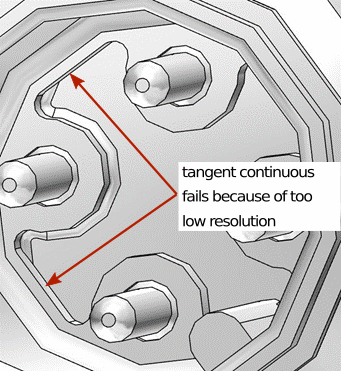
If a line follows a curve and tangent continuous fails, the problem is always too low resolution.

However, if a section is followed by another section at an obtuse angle and the tangential continuation does not work, the reason is the angle of more than 15° (see above).

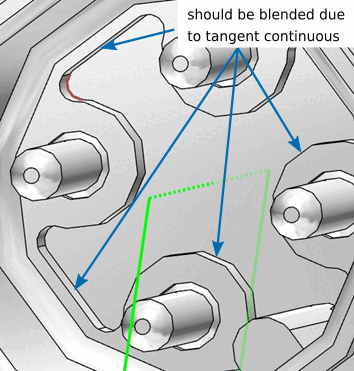
In following example edge selection is used. For a few edges tangent continuous works, but at two other edges tangent continuous stops due to too low resolution.
| Note |
|---|---|
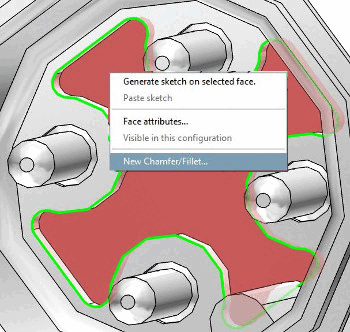
Especially for a continuous contour, do not use edge selection, but face selection, since this is considerably less effort compared to a selection of the individual edges! | |
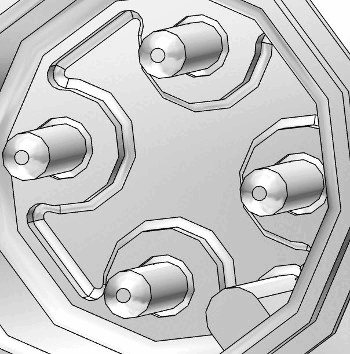
The two following figures show the use of face selection.
| Note |
|---|---|
| |