![[Note]](https://webapi.partcommunity.com/service/help/latest/pages/jp/partwarehouse/doc/images/note.png)
If you assign an ERP number to a project in a cloud catalog (a catalog on an external server), the project is installed in the local data directory. If the catalog on the external server is updated, you can now update these locally installed projects as well. In the process, the parts with ERP numbers are assigned to the new parts—just as with the installation of a CIP.[17]
The update
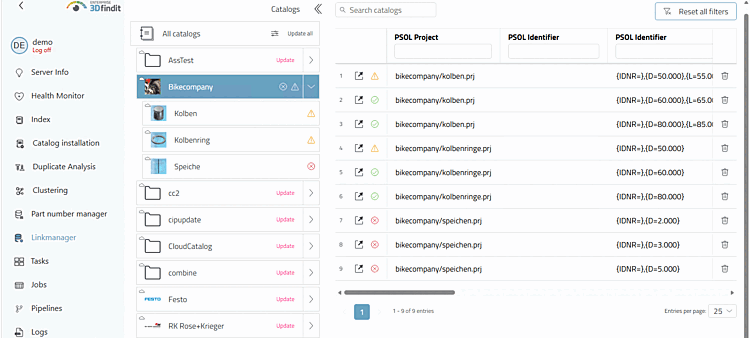
start in the link manager of the dashboard with "Update" and check the
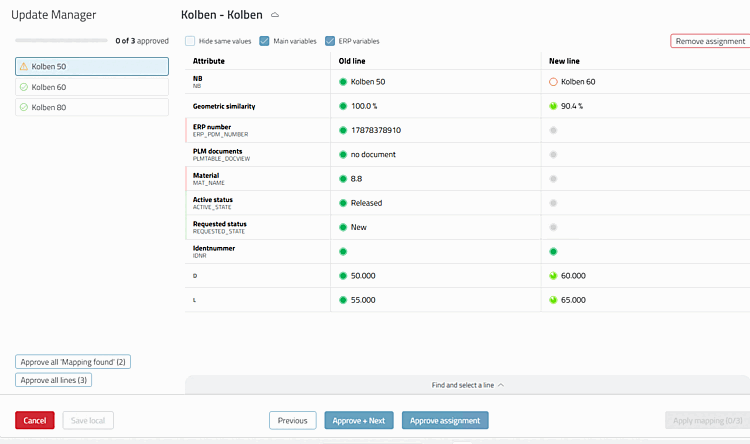
assignment then in the Update Manager; alternatively, it runs automatically
about a task (see the following section). The prerequisite is a
external application server entered in the [ExternalAppServer] section of the pappserver.cfg.
The document describes the setup and process on the issue.
Described in detail in the chapter " Section 5.17.3, “ Catalog Update with ERP Integration - Resolve Assignment Issues Using Update Manager (via Dashboard > Link Manager) ” in ENTERPRISE 3Dfindit (Professional) - Administration.