
5.12.11.15. Symbol
representations (Circuit symbols) "Advanced"
5.12.11.15.3. Preconditions |  |
| Prev | Next |
A symbol representation classification in the sense of the example at Section 5.12.11.15.5.1, “Symbol representation with Phoenix Contact 2903156” can only be created as an "add-on" if a part has already been completely classified according to the entire electrical classification. This includes in particular the creation of the classes and characteristics as described at Section 5.12.11.5.2, “Connections, IEC function symbols ”.
An error-free function description (Section 5.12.11.5.2, “Connections, IEC function symbols ”) is a prerequisite (not required for pipeline import and only applies to manual or semi-automatic classifying[54]).
The classes used for the "Advanced" symbol representations are CNSCAX|GFX|SYMREP [symbol representation(s)], CNSCAX|GFX|1 [symbol connections] and CNSCAX|GFX|2 [symbolic text blocks].
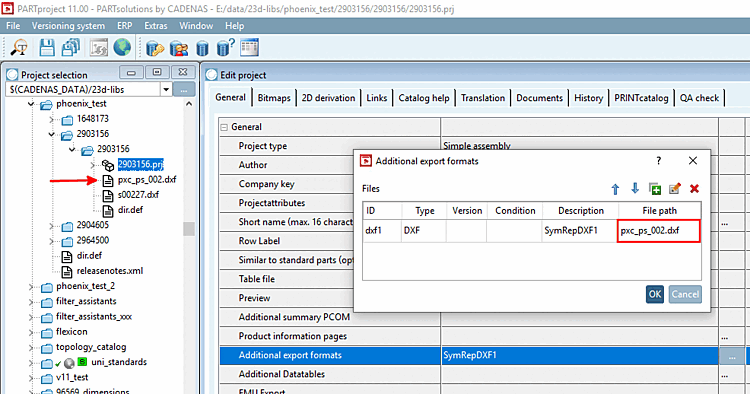
The symbol representations (2D vector graphic files [DXF/DWG/2db]) must be included in PARTproject under Additional export formats. (They can be located anywhere in the catalog)
![[Note]](https://webapi.partcommunity.com/service/help/latest/pages/jp/partwarehouse/doc/images/note.png)
Note Exactly this ID must be entered in the CNSCAX|GFX|SYMREP class, in the CNS_DOC_CNSURI characteristic. See below.
Enter a description. This is displayed under Additional export formats.
[54] The option of a symbol library is offered here so that the following steps only need to be carried out once when creating this library. Equipping a part with symbols is then essentially limited to applying a template that already contains the described symbol classification.