
1.1.1.3.2. PARTproject 1.1.1.3.2.6. TestMeta: New error message for color control variables with wrong location |  |
| Prev | Next |
With each QA-State-5 TestMeta run, the memory locations of variables for color control are now also checked.
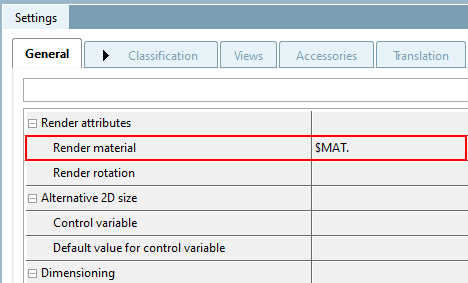
It does not matter whether the test takes place at catalog or project level. As soon as there is a variable on the General tabbed page under Render materials [Render Materials], the storage location is checked.
![[Important]](https://webapi.partcommunity.com/service/help/latest/pages/jp/partsolutions_user/doc/images/important.png) | Important |
|---|---|
The variable must be saved in geometry and table [In geometry and table], otherwise the color search will not work. For this reason, the error message has been added. | |
If the variables in the catalog or the projects have the wrong storage location, an error message appears in the TestaMeta run.
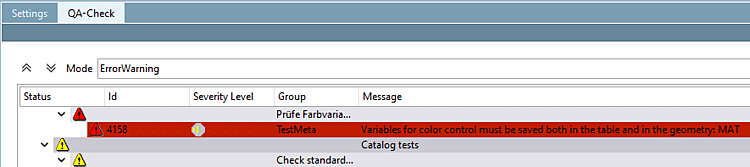
You can correct the error in the Variable Manager (either in PARTproject or in PARTdesigner ) by changing the storage location [Save location] to In geometry and table and saving.
Further information on the topics can be found here: Section 5.8.2.1.16, “ Test project / Test directory ” in eCATALOG 3Dfindit and Section 5.8.2.1.20.8, “ Manage variables ” in eCATALOG 3Dfindit.