
 |
For the classification[6] of projects there are different scenarios:
Classification of projects during the catalog development on behalf of the catalog manufacturer within the module PARTproject
On this compare under Section 5.12.5, “ Add projects to classification (context menu) ” in eCATALOGsolutions Manual.
The classification information is stored inside the project file.
Classification of projects which are not classified in the catalog yet
This additional possibility exists if an ERP integration is available.
Normally this information is stored in the project file. With ERP integration it can be stored in the LinkDB alternatively.
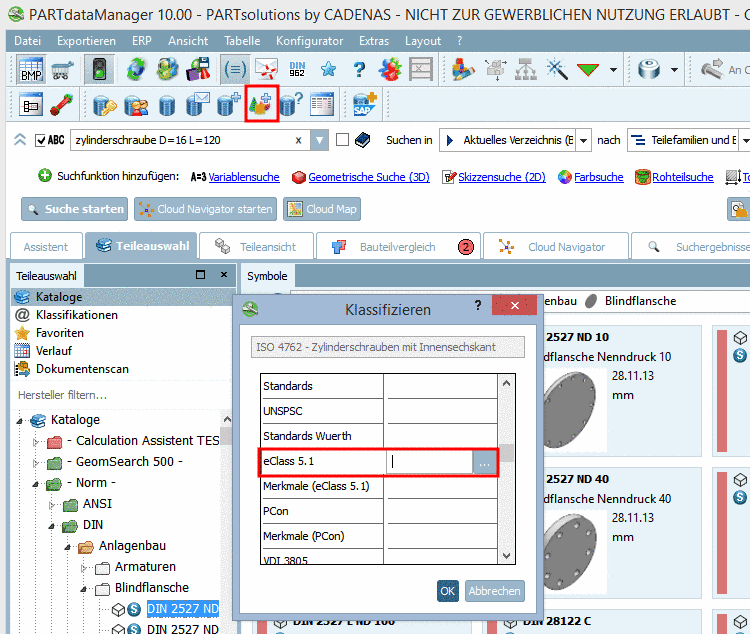
In the ERP toolbar click on the button Classify project
 .
.-> The dialog box Classify opens.
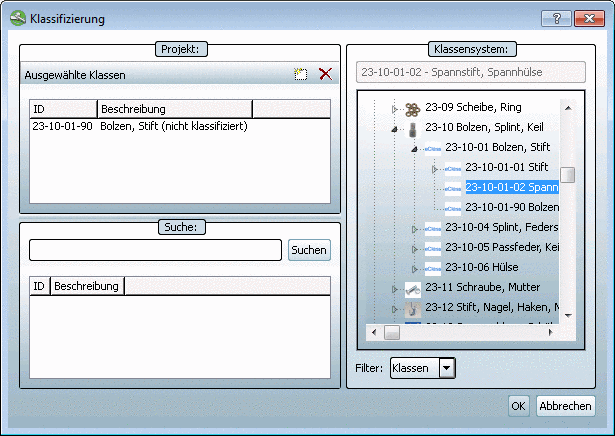
Select the desired classification and click on the search button .
Select the desired class by double-clicking on it or first select it and then click on the buttonAdd
 .
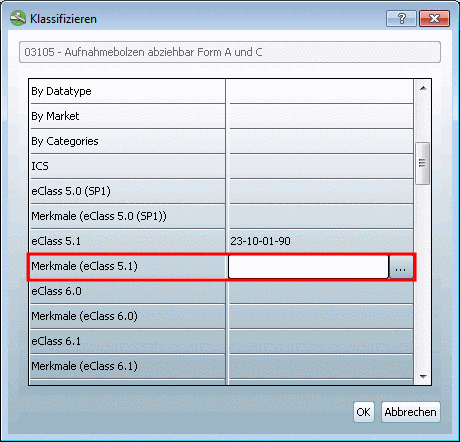
.In the attribute line of the desired classification click on the search button now.
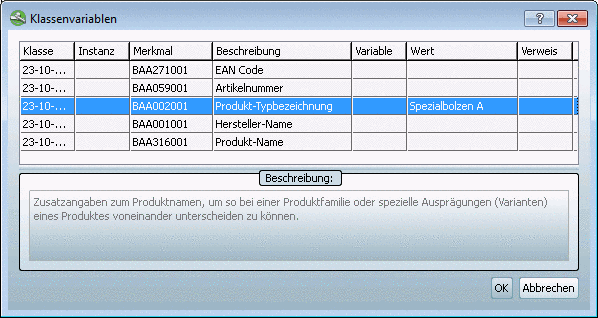
At the desired attribute, in the list field of the column Variable, select one or enter a fixed value in the column Value.
![[Note]](https://webapi.partcommunity.com/service/help/latest/pages/jp/partsolutions_user/doc/images/note.png)
In order for the
icon Classify project to be displayed you have to perform the respective
settings in the configuration file. See Section 1.7.8.2, “
Tweak
menus, menu items, toolbars, buttons and context menu commands
” in PARTsolutions - Administration Manual.