

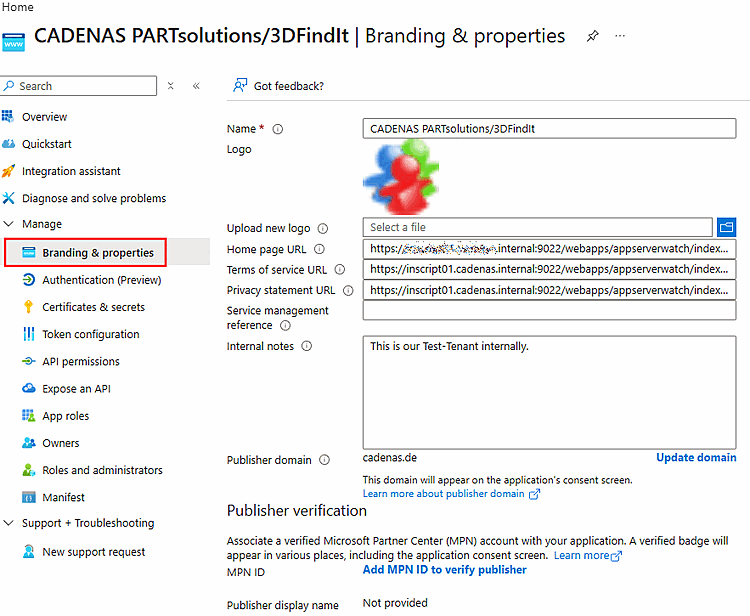
If you want to launch ENTERPRISE 3Dfindit via the Microsoft MyApps portal (myapplications.microsoft.com), additional settings are required in the Microsoft Entra ID app registration:[7]
The homepage The app registration URL must point to the base URL of the ENTERPRISE 3Dfindit instance, for example:
https://<hostname>:<port>/webapps/3dfindit-enterprise/
In the associated Enterprise Application, the " Visible to users " option must be enabled.
If the " User assignment required " option is enabled, the appropriate users or groups must be assigned to the application.
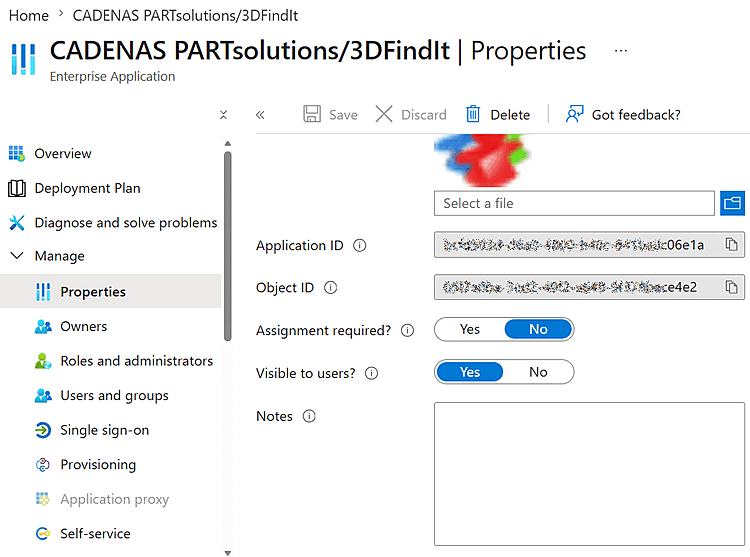
Without these settings, the application may not appear in the Microsoft portal MyApps or may not be able to be launched from there.
For more details, see Section 1.4.5.9.3.2.1.1.1, “Azure App Registration” in ENTERPRISE 3Dfindit (Professional) - Administration.