

On the tabbed page for "Login [Login] ", you'll find four subpages:
Web Login Methods: Web Login is for "
/service/login" in 3Dfindit, is used for disabling individual methods (hostnames or certain IP ranges).Client Login Methods: Client login refers to the methods available in PARTdataManager and PARTadmin .
OpenID Provider: Required if you want to have multiple authentication providers. Also, if you want to have an additional OpenID client with special permissions for API access (keyword: "Power Automate").
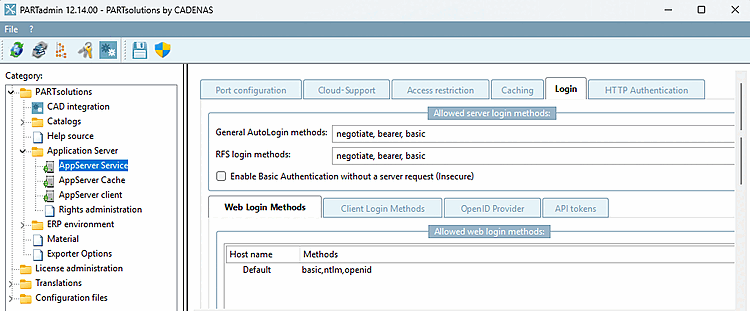
![Tabbed page "Login [Login]"](https://webapi.partcommunity.com/service/help/latest/pages/jp/partsolutions_user/doc/resources/img/img_8ae8e23e4e2a4e43b2d0d32c1501cc87.png)
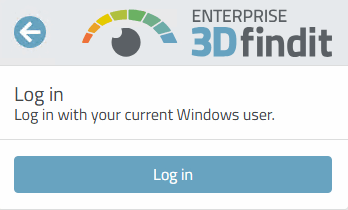
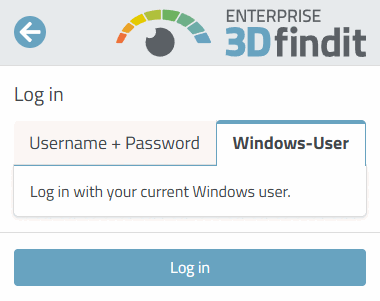
![Tabbed page "Login [Login]"](https://webapi.partcommunity.com/service/help/latest/pages/jp/partsolutions_user/doc/resources/img/img_67c51e8bd87643928372fa4396f45e7c.png)
Enter a domain (e.g., "CNS") or a hostname (e.g., DE-AGB-NAME-01) in the "Rule [Rule] " column using free-form input.
Click in the Databases column on a field, open the drop-down list containing the options WINDOWS, ERP, OPENIDC, SQL, FILE, and LDAP, and select the desired options.
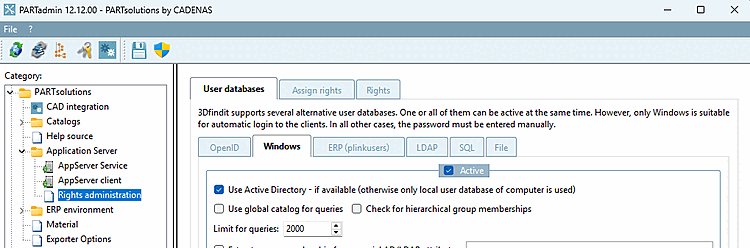
The options listed here are configured under the " Permissions Management [Rights administration]" category.
Advanced OpenID Authentication
The extensions are now available via a graphical user interface. This eliminates the need to manually edit configuration files.
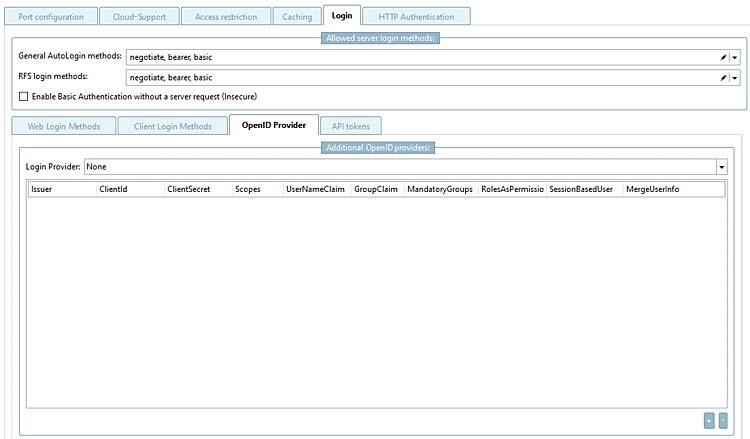
Enable Basic Authentication without a server request (Insecure) [Enable Basic Authentication without a server request (Insecure)]: If this option is enabled, the username and password are transmitted in plain text.
Login Provider: For AppServer solutions, there is exactly one OpenID provider, which is configured here. This is the OpenID provider that is displayed during the 3Dfindit login.
In addition to the regular login provider [Login Provider], you can configure as many additional OpenID providers [OpenID Provider] as you like by clicking the button. This allows for the parallel support of various identity sources, which is particularly important for integrations and automation scenarios.
The configuration includes the following settings:
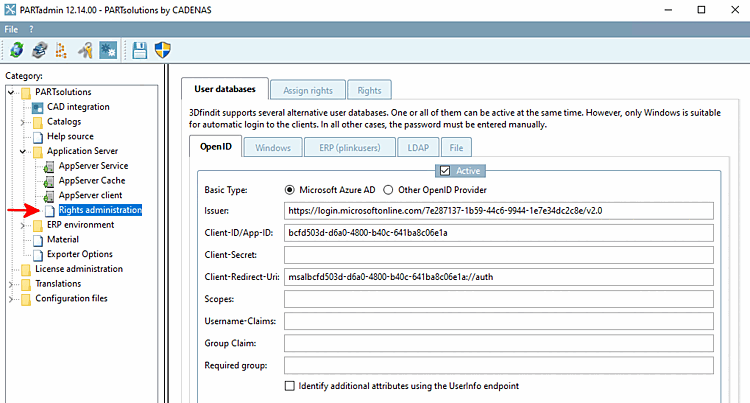
This way, you can configure additional providers regardless of the settings under Rights Management [Rights administration] > User Databases [User databases] > OpenID.
![AppServer Service > Tabbed page "Login" > "API Tokens [API tokens]" Tabbed page](https://webapi.partcommunity.com/service/help/latest/pages/jp/partsolutions_user/doc/resources/img/img_dcea47d9cf0c4f3d9c9530a12ca0ea8d.png)
API Token Authentication for easy and secure Web API access
To support automated access to the server API, an API token mechanism was introduced. The goal is to enable scripts and integrations to authenticate securely without having to use user passwords directly. In addition, the authentication infrastructure has been expanded so that multiple OpenID providers can be configured in parallel. Another advantage of a separate API token is that the API key can be easily deleted without compromising the user in question.
API Tokens for Automated Access
API tokens serve as the recommended authentication method for script-driven REST API access. They are associated with an existing user account and inherit that account's permissions. This allows automated applications to access the API on behalf of a user without knowing or storing the user’s password.
Unlike Basic Authentication, in which the username and password are transmitted, API tokens can be managed independently of the user's password. If a token is compromised, it can be revoked and regenerated without requiring any changes to the user's account.
An API token consists of a public token ID and a secret [Secret].
Use the " " button to generate an ID and a secret.
Be sure to enter a user. All users who are listed under " Permissions Management [Rights administration] " can be entered here.
In addition, API tokens can optionally be restricted, for example, to:
These restrictions reduce the risk of abuse and enable controlled use of automated access.
Copy the ID, Secret, and the remaining settings to the clipboard using the " button.
The secret [Secret] is displayed only during creation and cannot be read afterward. This prevents access data from being disclosed later.
![[Note]](https://webapi.partcommunity.com/service/help/latest/pages/jp/partsolutions_user/doc/images/note.png)
After clicking , the entry is saved.

Advanced OpenID Authentication
The extensions are now available via a graphical user interface. This eliminates the need to manually edit configuration files.
Enable Basic Authentication without a server request (Insecure) [Enable Basic Authentication without a server request (Insecure)]: If this option is enabled, the username and password are transmitted in plain text.
Login Provider: For AppServer solutions, there is exactly one OpenID provider, which is configured here. This is the OpenID provider that is displayed during the 3Dfindit login.
In addition to the regular login provider [Login Provider], you can configure as many additional OpenID providers [OpenID Provider] as you like by clicking the button. This allows for the simultaneous support of various identity sources, which is particularly important for integrations and automation scenarios.
The configuration includes the following settings:
This way, you can configure additional providers regardless of the settings under Permissions Management [Rights administration] > User Databases [User databases] > OpenID.
Service runs as a local system and does not require access to network shares (requires access to network shares via UNC path)
Standard configuration from Microsoft for Windows authentication (Kerberos) works. Only the computer name must be added to the Local Intranet Zone in the browser settings of the clients.
Service requires access to external network shares. It must then run as a service user and the SPN entry (Service Principal Name) must be set correctly in the AD. And the computer name must be included in the Local Intranet Zone in the browser settings of the clients.
setspn -S HTTP/servername.domain.name DOMAIN\serviceuser