

The basic structure of the toolbar and menus is specified in this configuration file.
![[Note]](https://webapi.partcommunity.com/service/help/latest/pages/jp/partsolutions_user/doc/images/note.png) | Note |
|---|---|
Normally you do not need to change these settings. The visibility of elements is controlled by menuvisibility_PARTproject.cfg. | |
For general explanations, see menustructure_PARTdataManager.cfg.
[Tweakmenu]
toolbarOrderTop=Standard,LinkDatabase
toolbarOrderRight=
toolbarOrderLeft=
toolbarOrderBottom=
Compare menustructure_PARTdataManager.cfg.
To customize the layout of the button display, use the setting options of the "<name>ToolbarButtonStyle " key. Compare menustructure_PARTdataManager.cfg.
The key values of menuOrder represent the desired order of the individual menus.

| Menu name | Action name |
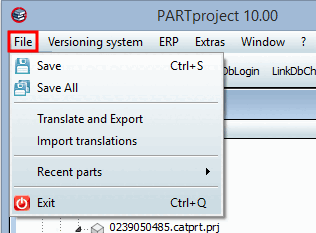
| File | FileMenu |
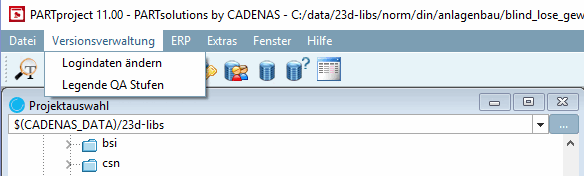
| Versioning system | QAMenu |
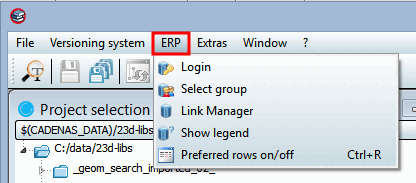
| ERP | ErpMenu |
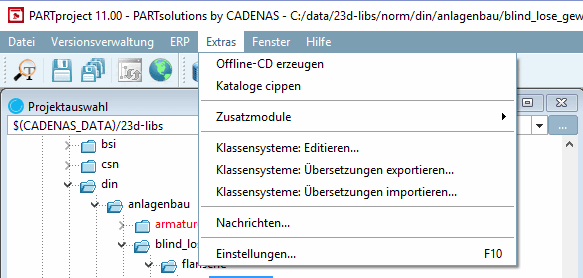
| Extras | ExtrasMenu |
| Window | WindowMenu |
| Help | HelpMenu |
menuOrder=FileMenu,QAMenu,ErpMenu,ExtrasMenu,WindowMenu,HelpMenu
The key values do not usually need to be changed.
FileMenuName=FileMenu FileMenuTitle=&File FileMenuContent=FileSave,FileSaveAll,-,FileExportTrans,FileImportTrans,-,
 actionRecentFilesList,-,FileExit
Individual adjustments are made in the configuration file Section 1.7.8.2.3.2, “ menuvisibility_PARTProject.cfg: Action names of menus, menu items, toolbars and buttons”.
Version management [Versioning system] menu
Normally the key values don't have to be changed.
QAMenuName=QAMenu
QAMenuTitle=&Versionsverwaltung
QAMenuContent=QALogin,QALegend
Individual adjustments are made in the configuration file menuvisibility_PARTProject.cfg.
Normally the key values don't have to be changed.
ErpMenuName=ErpMenu
ErpMenuTitle=ERP
ErpMenuContent=LinkDbLogin,LinkDbChangeGroup,CallLinkMgr,LinkDbShowLegend,PreferredRanges
Individual adjustments are made in the configuration file menuvisibility_PARTProject.cfg.
Normally the key values don't have to be changed.
ExtrasMenuName=ExtrasMenu
ExtrasMenuTitle=E&xtras
ExtrasMenuContent=ExtrasOfflineCD,ExtrasCipCatalog,-,actionPluginList,-,
 ExtrasEditClassSystem,ExtrasExportCSystemTranslation,ExtrasImportCSystemTranslation,-,
 ExtrasMessageList,-,ModePreferences,-,ShowPreferences
Individual adjustments are made in the configuration file menuvisibility_PARTProject.cfg.
Normally the key values don't have to be changed.
WindowMenuName=WindowMenu
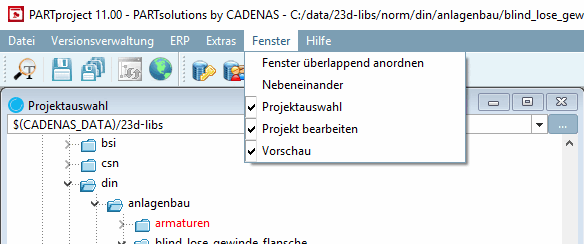
WindowMenuTitle=&Window
WindowMenuContent=actionWindowCascade,WindowsTile,WindowsTree,WindowsEdit,WindowsPreview
Individual adjustments are made in the configuration file menuvisibility_PARTProject.cfg.
Normally the key values don't have to be changed.
HelpMenuName=HelpMenu
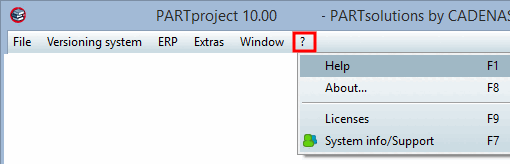
HelpMenuTitle=&?
HelpMenuContent=HelpHelp,HelpAbout,-,HelpLicenses,HelpSysInfo
Individual adjustments are made in the configuration file menuvisibility_PARTProject.cfg.
Normally the key values don't have to be changed.
StandardToolbar=MainWindow/Standard
StandardToolbarTitle=Standard
StandardToolbarContent=FileSearch,-,FileSave,FileSaveAll,-,UpdateIndex,ShowPublishingState
Individual adjustments are made in the configuration file menuvisibility_PARTProject.cfg.
Normally the key values don't have to be changed.
LinkDatabaseToolbar=MainWindow/LinkDatabase
LinkDataBaseToolbarTitle=Link database
LinkDatabaseToolbarContent=LinkDbLogin,LinkDbChangeGroup,CallLinkMgr,LinkDbShowLegend,
 PreferredRanges
Individual adjustments are made in the configuration file menuvisibility_PARTProject.cfg.
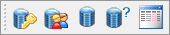
![Standard [Default] toolbar](https://webapi.partcommunity.com/service/help/latest/pages/jp/partsolutions_user/doc/resources/img/img_f607c6ad28244bfd9531f5d7d4c71f8d.png)
The [hasSubMenuActions] block contains the standard declaration for all actions with an additional menu level. The name of the top-level action is set as the key. The actions of the next level down are listed one after the other, separated by commas.
![Example: "Recently opened files [Recent parts] " menu item, with sub-items](https://webapi.partcommunity.com/service/help/latest/pages/jp/partsolutions_user/doc/resources/img/img_7058dddb1a9047fdba41600b1eab6f03.png)
[hasSubMenuActions] listOfMenus=actionRecentFilesList actionRecentFilesListName= RecentFile_Menu2Content=RecentFile_Menu0_Entry6,RecentFile_Menu0_Entry7,