In "Warning" and "ErrorWarning" modes [Mode], a warning level [Warning level] filter has been added. With "Low," for example, you can filter messages related to linked projects. These are displayed with a green warning triangle.
![Example with "Alert Level [Warning level]" set to "Low"](https://webapi.partcommunity.com/service/help/latest/pages/jp/partsolutions_user/doc/resources/img/img_c9808cf78b784031a03f9499fc70a333.png)
In addition, a new filter for critical warnings has been added. These are displayed with an orange warning triangle.
With the "Test Links" [Check links] option, linked projects outside the tested directory were previously included in the check, but they were classified only as "normal" warnings, so they were lost in the flood of warnings.
Among other things, this is why there are now warning levels. The "Low" filter can be used to filter out specific warnings of this type. In addition, projects found outside the system are now displayed in a notification message.
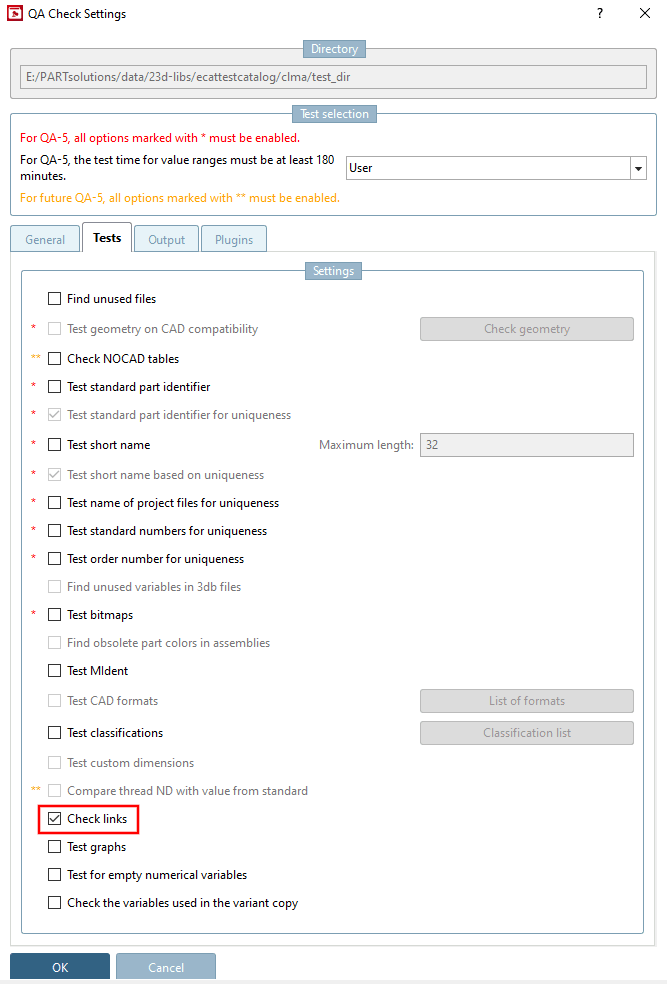
In the QA Check Settings [QA Check Settings] dialog box, select the " Test References [Check links]" option.
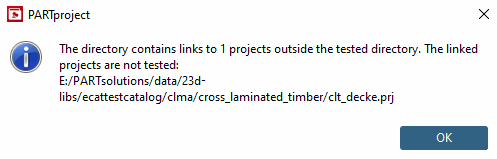
-> Before TestMeta starts, the program checks whether there are links to projects outside the selected directory. If so, a message appears indicating that links to projects outside the directory to be tested exist. (If you do not want this message to appear, set the value in $CADENAS_USER > pproject.cfg > Block TESTMETA > Key showLinkedOutsideTestedDir to 0 (the default is 1).
The notification about found links is displayed at the end of the check as a green information message (and no longer just as a yellow warning). See the figure above.