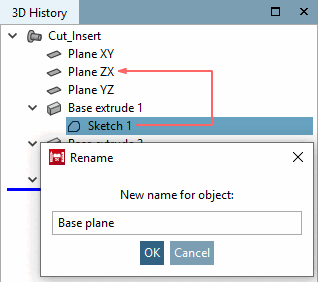
You can use the context menu command Rename to adapt the display names of features (sketch [Sketch], drawing [Drawing], pattern [Pattern], hole [Drill], etc.) to your own nomenclature.
In the example given, the default expression Sketch 1 would be replaced by the term Base plane .
![[Note]](https://webapi.partcommunity.com/service/help/latest/pages/jp/partsolutions_user/doc/images/note.png) | Note |
|---|---|
The sketch name (e.g. "Sketch 1") can also be edited if you click on it and then press the F2 key. | |