
3.3.7.
NX Integration - Administration
3.3.7.10. NX:
Macro placement with model type differentiation |  |
| Prev | Next |
The placement macros support "model type markers", specifically:[55]
These markers allow the PSOL interface to insert the appropriate macro line depending on the model being placed.
In this way, the "CNS_SOLID" reference set can be set for CADENAS parts, "SOLID" for proprietary parts, and "Entire Part" for assemblies, all using a single macro. Only one of these lines will be used per export model type.
The downside here is that the corresponding macro lines cannot be generated automatically (due to significant variation in reference set indexing across different environments).
Find the last line that contains "! Model ("MODEL")".
Replace the highlighted line with the following 4:
<<CNS_PART>>EVENT ACTIVATE 0 0, 46268416, 8, 0, 0!
<<CNS_ASM>>EVENT ACTIVATE 0 0, 46268416, 0, 0, 0!
<<CNS_NAT_PART>>EVENT ACTIVATE 0 0, 46268416, 0, 0, 0!
<<CNS_NAT_ASM>>EVENT ACTIVATE 0 0, 46268416, 0, 0, 0!
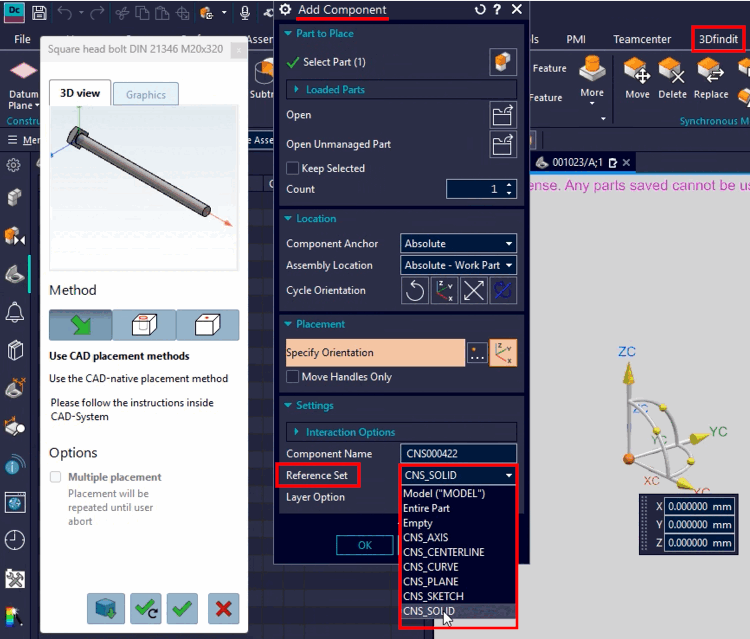
The "8" (third digit from the right) in the <<CNS_PART>> line represents the index of the desired reference set, as shown in the following image. In a standard installation, this corresponds to the reference set "CNS_SOLID".
Depending on the customer's installation, the index of the desired reference set may vary.
"0" refers to the first element in the list, "1" to the second, and so on.
All others remain set to 0 in the macro, meaning they trigger the first element in the list (which corresponds to the "Entire Part" reference set for assemblies or "Model" for individual parts).

![[Note]](https://webapi.partcommunity.com/service/help/latest/pages/jp/installation_ecatalogsolutions/doc/images/note.png)