5.12.4. Simple assigning of important variables to CNS classification

[Note]Note

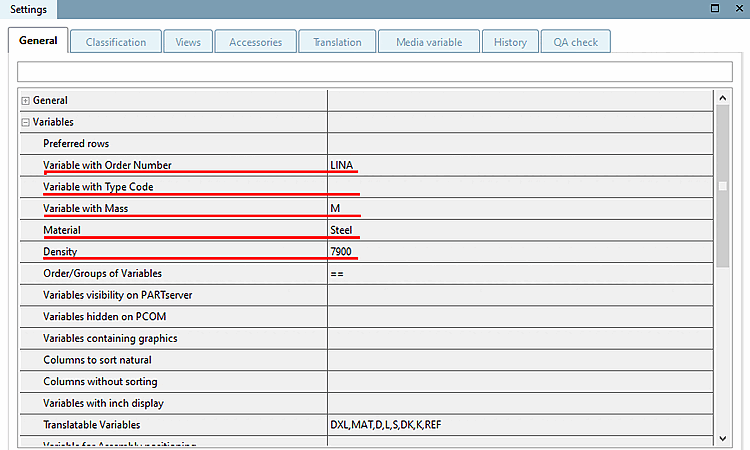
The following entries under Settings -> tabbed page General -> Variables are automatically inserted into the CNS classification and thus transferred to the CAD system. [a]

  • Variable with order number [b]

  • Variable with type code [c]

  • Variable with mass

  • Material

  • Density [kg/m³]

[a] In principle, attributes of any classification can be transferred to CAD/PDM. In the course of consulting, then respective settings are made via configuration files.

[b] The class variable CNSORDERNO is mapped to the desired variable under Variable with order number.

[c] The class variable CNSTYPECODE is mapped to the desired variable under Variable with type code.

Edit project -> tabbed page General -> Variables

Edit project -> tabbed page General -> Variables

Once the entries under Variables are set, these are automatically transferred to Classification -> CNS.
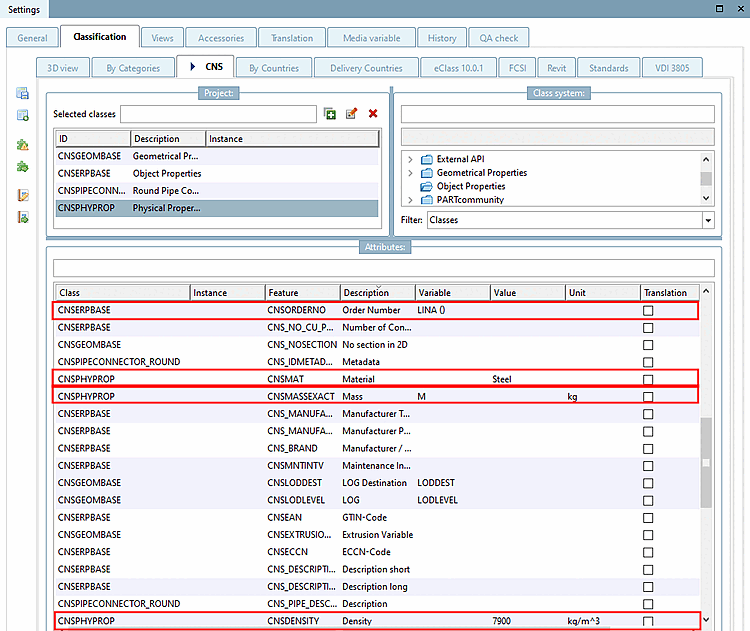
Entry under Variables Class Feature
Variable with order number CNSERPBASECNSORDERNO
Variable with type code CNSERPBASECNSTYPECODE
Variable with mass CNSPHYPROPCNSMASSEXACT
Material CNSPHYPROPCNSMAT
Density [kg/m³] CNSPHYPROPCNSDENSITY

Class variables

Class variables