
7.8.12.
Attribute algorithms
7.8.12.9. Various thread pitches and derived automatic calculations for e.g. line description and core diameter
|  |
| Prev | Next |
With the help of the expressions GETTHREADTEXT or GETTHREADVALUE different output can be created by little adjustments. GETTHREADTEXT returns text, GETTHREADVALUE a number (double). The functionality is equivalent.
With the help of the first four parameters a row is specified, the fifth parameter specifies the variable whose value shall be returned.
VARIABLE = GETTHREADTEXT(D,'DIN 13','',P,'NAME')
![[Note]](https://webapi.partcommunity.com/service/help/latest/pages/jp/ecatalogsolutions/doc/images/note.png) | Note |
|---|---|
In the case of GETTHREADTEXT the data type of VARIABLE has to be text. In the case of GETTHREADVALUE the data type of VARIABLE has to be a number. | |
Rückgabewert

NAME  =  GETTHREADTEXT(D,'DIN 13','',P,'NAME') // ergibt z.B. M10x1
TYPE  =  GETTHREADTEXT(D,'DIN 13','',P,'TYPE') // ergibt z.B. M
KDI   =  GETTHREADTEXT(D,'DIN 13','',P,'KDI')  // Kerndurchmesser Innengewinde
KDA   =  GETTHREADTEXT(D,'DIN 13','',P,'KDA')  // Kerndurchmesser Aussengewinde
SIZE  =  GETTHREADTEXT(D,'DIN 13','',P,'SIZE') // ergibt z.B. 10x1
| Note |
|---|---|
Any table variable can be used for the last parameter. The above mentioned (NAME, TYPE, KDI, KDA, SIZE) are always available normally.
| |
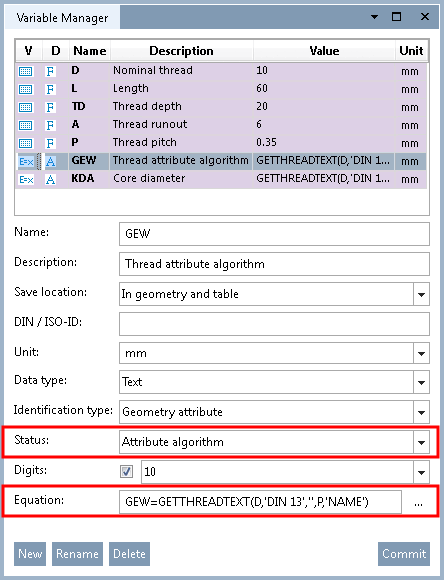
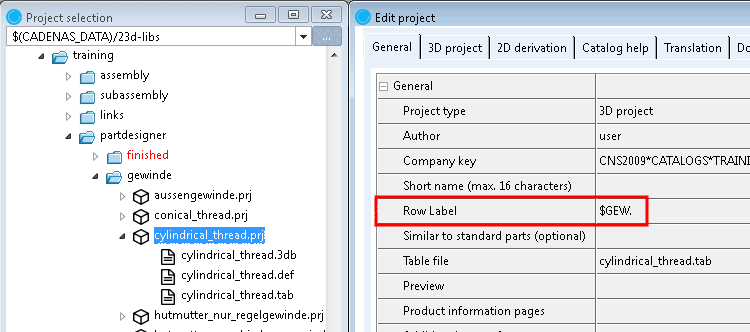
-> The content of the field "NAME" of table "DIN 13" is returned to variable GEW as text.
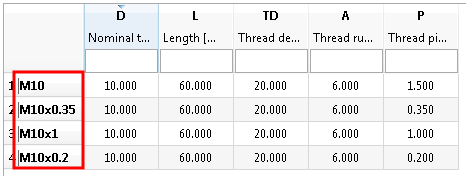
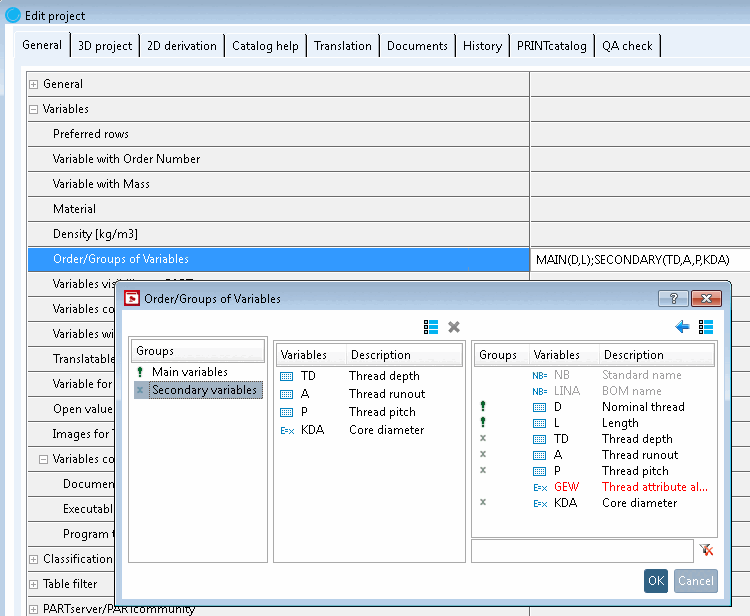
Calculate core diameter [Core diameter] external thread [Outer thread] automatically and display in PARTdataManager
KDA = GETTHREADTEXT(D,'DIN 13','',P,'KDA')
![Line description [Row label] / core diameter [Core diameter]](https://webapi.partcommunity.com/service/help/latest/pages/jp/ecatalogsolutions/doc/resources/img/img_55dbe3d6825e4ae3a5b2481adbd36068.png)
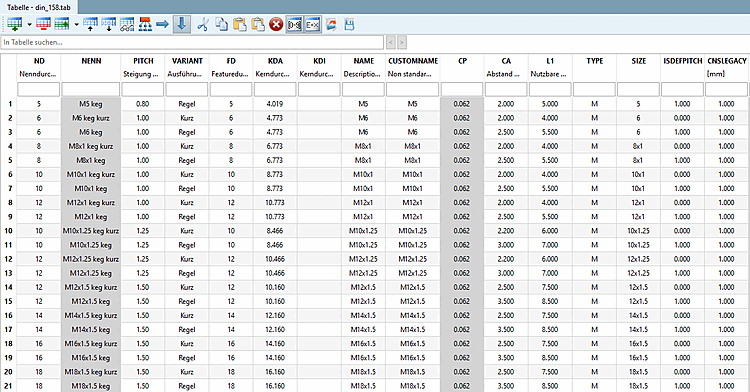
GET=GETTHREADTEXT(ND,'DIN 158',VARIANT,PITCH,'NENN')
Compare Fig. „Example: Thread table of DIN 158“.
X=GETTHREADVALUE(ND,'DIN 158','Kurz',PITCH,'L1')
-> The value for ND is taken and set as filter for the nominal diameter in table "DIN 158".
-> The value of PITCH is taken and set as filter for the pitch in table "DIN 158".
-> The filter "variant = 'Kurz' is set in table "DIN 158".
-> The content of field L1 of table "DIN 158" is returned as a number.