

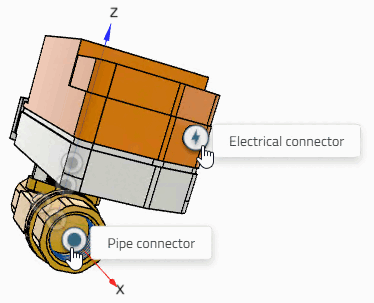
If there is an enrichment for electrical or piping, the corresponding icon is automatically displayed in 3Dfindit.

Added value: Users can immediately see what a connection is about.
Note: A current classification must be installed for the points to be visible.
![Example: CNS electrical connections [CNS_CP|...]](https://webapi.partcommunity.com/service/help/latest/pages/jp/ecatalogsolutions/doc/resources/img/img_0459540eac03438d842192720d62ba13.png)
![Example: CNS pipe connections [CNSPIPECONNECTOR]](https://webapi.partcommunity.com/service/help/latest/pages/jp/ecatalogsolutions/doc/resources/img/img_5007ef6d327e4b83bf0ab32e557e6cb3.png)
In the
Configuration file under $CADENAS_DATA/datasetup/prjoptions/prjoptions.cfg
determines which icon is displayed for which classes. Currently,
this is either the one for Electrical connector
 or the one for Pipe connector
 .
.
[LabelTypes] electrical=CNS_CP|4|3,CNS_CP|4|6,CNS_CP|4|7,CNS_CP|4|8,CNS_CP|4|9,CNS_CP|4|10,CNS_CP|4|11,CNS_CP|4|12,CNS_CP|4|13,CNS_CP|4|14,CNS_CP|4|15|1,CNS_CP|4|15|2,CNS_CP|4|15|3,CNS_CP|4|17,