

3Dfindit variables (geometric, NT, NN, LINA, etc.) and all fields of the link database (if an ERP link exists) can be transferred to NX via attribute mapping. These are then displayed in the Component Properties dialog.
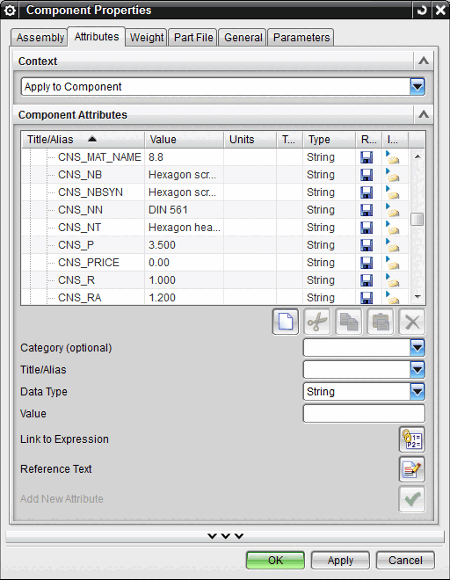
Attributmapping wird über folgende zwei Blöcke gesteuert:
AttributeMapping(is3d) In the "AttributeMapping(is3d)" block, you can define whether the 3Dfindit standard attributes are to be transferred to the CAD system and, if so, in which language(s).
Set the desired language under Attr_CopyFrom_01. The keys Attr_Content_01 and Attr_Section_01 remain unchanged.
default: The attributes are exported in English. Assigned language: The standard attributes are exported in the indicated language.
default,german,english,italian,french,spanish,portuguese,czech,slovak,hungarian,slovenian,dutch,danish,finnish,russian,japanese,korean,chinese,polish
![[Note]](https://webapi.partcommunity.com/service/help/latest/pages/jp/partwarehouse/doc/images/note.png) | Note |
|---|---|
If there is no translation for the indicated language of the attribute, no attribute is exported (not even from the german language). | |
No entry: If all Attr_CopyFrom fields are left empty, no standard attributes are exported. (If you explicitly want to export specific attributes, use the CadDocumentAttributes block) In NX, the attributes are displayed in the Component Properties dialog (see illustration above).
Define prefix for 3Dfindit attributes
In order to set a prefix do the following:
Insert a new key Attr_Prefix_01 via the context menu command Insert key. The key value is the prefix.
Save the settings in PARTadmin.
-> Now all 3Dfindit attributes will contain the prefix (in the above example this is "CNS_").