
 |
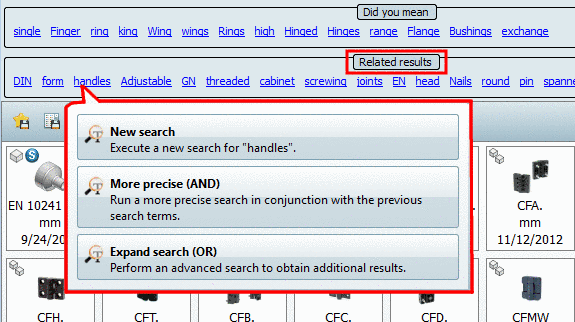
After conducting a textual search, you can further modify your results using related terms.
To do so, click on one of the displayed "related terms".
A dialog box with the following selection options opens:
Run a more precise search in conjunction with the previous search terms.
This refers to an AND combination of the two terms. The originally searched for one and this one must both be accurate.
Perform an advanced search to obtain additional results.
This refers to an OR combination of the two terms. At least one of the two must be accurate.
![[Note]](https://webapi.partcommunity.com/service/help/latest/pages/jp/partwarehouse/doc/images/note.png) | Note |
|---|---|
In the Extras menu under Settings..., list selection Search, index page Text Search you can set whether and how many Related results should be displayed. See Section 3.3.14.2, “ Text Search ” in PARTsolutions - User manual. | |