
 |
Do you often use the same search settings?
Especially when complex settings are used you can save time when using Search templates:
Perform all desired settings. (As many methods as you like can be used.)
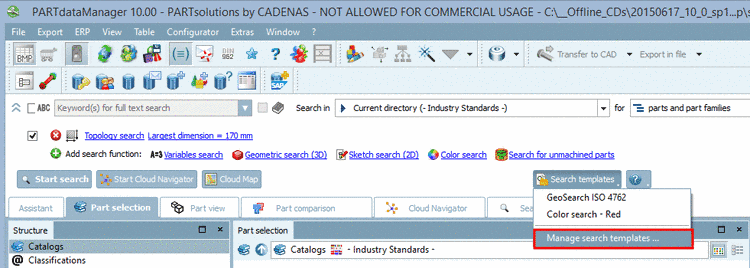
Open the list by clicking on the small black arrow of the button and then click on the list item Manage search templates ....
-> The dialog box Manage search templates opens.
Enter the desired Description for the new created search template and confirm with .
When you want to load the saved template again, then click on the button and then in the list on the desired search template.
Alternatively you can open the dialog box Manage search templates ... again and there click on the icon
 Load search at the
desired template.
Load search at the
desired template.-> The dialog box automatically closes and the search settings are loaded.
By clicking on
 you can delete templates which are not needed
anymore.
you can delete templates which are not needed
anymore.
![[Note]](https://webapi.partcommunity.com/service/help/latest/pages/jp/partwarehouse/doc/images/note.png)