
5.23.3.2. Adding buttons to the user interface
5.23.3.2.2. Custom subbuttons in the
main bar |  |
| Prev | Next |
    "mainMenuIcon": "/webapps/3dfindit-enterprise/plugins/plugInDefault.svg",
    "mainMenu": [
      ["customButton1_Group1", "customButton2_Group1", "customButton3_Group1"],
      ["customButton1_Group2", "customButton2_Group2", "customButton3_Group2"]
    ],
Sub-arrays create groups. However, this only works for the "mainMenu" toolbar, as the others normally only display individual buttons.
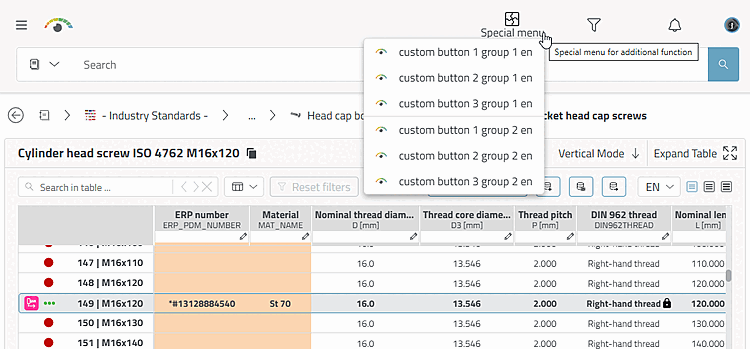
In the following example, the buttons are assigned to two different groups:
    "mainMenuIcon": "/webapps/3dfindit-enterprise/plugins/plugInDefault.svg",
    "mainMenu": [
      ["customButton1_Group1", "customButton2_Group1", "customButton3_Group1"],
      ["customButton1_Group2", "customButton2_Group2", "customButton3_Group2"]
    ],

      "customButton1_Group1": {
        "type": "VBS",
        "icon": "/webapps/3dfindit-enterprise/plugins/3dFinditEyeColor.svg",
        "name": {
          "de-DE": "custom button 1 group 1 de",
          "en-GB": "custom button 1 group 1 en"
        },
        "script": "/plugins/vbb/custom1_startup.vbs",
        "tooltip": {
          "de-DE": "custom button 1 group 1 de",
          "en-GB": "custom button 1 group 1 en"
        }
      },
...
      "customButton1_Group2": {
        "type": "VBS",
        "icon": "/webapps/3dfindit-enterprise/plugins/3dFinditEyeColor.svg",
        "name": {
          "de-DE": "custom button 1 group 2 de",
          "en-GB": "custom button 1 group 2 en"
        },
        "script": "/plugins/vbb/custom1_startup.vbs",
        "tooltip": {
          "de-DE": "custom button 1 group 2 de",
          "en-GB": "custom button 1 group 2 en"
        }
      },
...
      },
...