

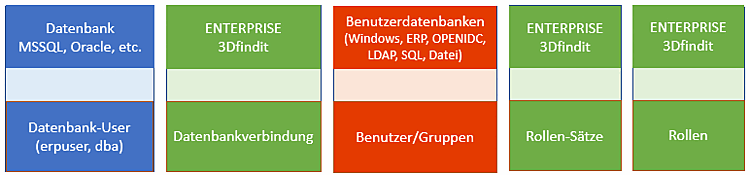
When setting up the ERP environment, the connection to the LinkDB is set in the Database connection subcategory, the mapping of users/groups [Users/groups] to role records [Role sets] in the Rights management [Rights administration] category and the mapping to roles [Roles] in the Role records [Role sets] category.
When all settings are consistently available, user/groups authenticate themselves and access the LinkDB.
![Category "Database connection [Database connection] "](https://webapi.partcommunity.com/service/help/latest/pages/jp/partsolutions_user/doc/resources/img/img_fdd2f2bc910441ccbde66d7b4fd03429.png)
![Category "Rights management [Rights administration]" → "User databases [User databases]"](https://webapi.partcommunity.com/service/help/latest/pages/jp/partsolutions_user/doc/resources/img/img_9bef2b7956784335a255746284de3735.png)
![Category "Rights management [Rights administration]" → "Rights assignment [Assign rights]"](https://webapi.partcommunity.com/service/help/latest/pages/jp/partsolutions_user/doc/resources/img/img_aed054ed879d4c46a5d3040afd52861a.png)
![Category "Roll sets [Role sets] "](https://webapi.partcommunity.com/service/help/latest/pages/jp/partsolutions_user/doc/resources/img/img_aabeedf34b98426ab185ff0d3ead2483.png)
![Category "Rolls [Roles] "](https://webapi.partcommunity.com/service/help/latest/pages/jp/partsolutions_user/doc/resources/img/img_b25efd67880f422f80728ee4fc91309d.png)
In the following the most important single steps for the creation of the role concept are described:
Create database users [Database user] via SQL scripting in LinkDB. See Section 5.2.4, “Create database scheme and users for ERP (exemplified by MSSQL)”.
Set up and test the database connection in the Database connection category.
See the following section "Database connection [Database connection] ".
Activation of the desired user databases [User databases] (one or more)
Mapping of users/groups [Users/groups] to role records [Role sets]
Assign a configuration to users or groups under Rights management [Rights administration] -> Rights assignment [Assign rights] tabbed page -> ERP -> Configuration.
Due to the assignment of rights, you do not necessarily need a separate configuration (=ERP user) for each "real user" (user or group).
Configurations (=ERP users) are only specified by a list of roles. So if several "real users" (users or groups) are allowed to assume the same roles, only one configuration is required. For example, Windows groups and/or Windows users can be selected under Users/Groups [Users/groups].
For example, you can first define a group with fewer rights (see entries under Profiles ) and then a single user with more rights, who is also a member of the group. To avoid conflicts, assign the individual user a higher priority than the group.