2.13.1.7.6. New template for Architecture / BIM field

In the architecture / BIM field there are some specifics concerning target systems. Details on this can be found under Architektur.

Already when creating the project these specifics are taken into account by selecting the adequate Template (Template for 3D project with LOD (AEC – Z-axis on top)).
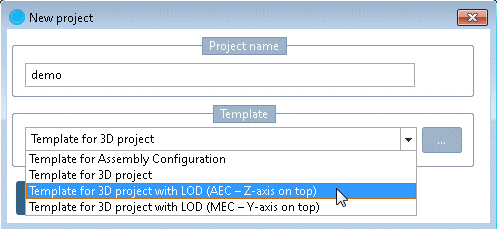
  • The parts must be located with the Z-axis to the top and with the Y-axis to the front (left in the isometric view)

  • The parts are equipped with LOD levels 100-500 usual in the architecture field.

    AEC LOD 100
    • No 3D representation

    • Representation only via 2D drawing

    • Drawing format must be 2DB

    AEC LOD 200
    • Representation as bounding box, e.g. cylinder or cuboid

    AEC LOD 300 = MEC LOD Low
    • Representation as a simple 3D model, without internal geometry, negative solids or cosmetic elements (like e.g. labels)

    • Equals the typical, mechanical LOD Low

    AEC LOD 350 = MEC LOD 350
    • Representation as medium-detailed 3D model, simple cut-bodies are allowed

    • No cosmetic elements or labels

    • Equals the typical, mechanical LOD Medium

    AEC LOD 400 = MEC LOD High
    • Representation as high-detailed 3D model, cut-bodies and cosmetic elements are allowed

    • equals the typical, mechanical LOD High

    AEC LOD 500 / 600 / 700
    • LOD stages higher than 400 are not specified from CADENAS yet

Control of LOD happens via table variables LODDEST and LODLEVEL.
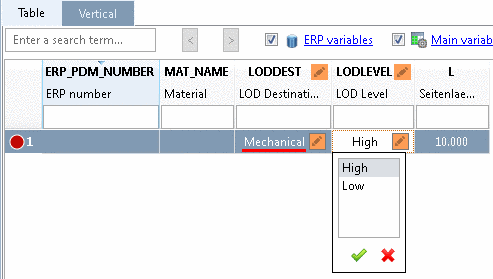
  • With the variable LODDEST at first the primary target market can be selected.

  • Depending on this, the value range LODLEVEL will show the known levels high / medium / low from mechanical market or the stages 100-500 from the architectural branch (depending on how many stages were set up).

LODDEST "Mechanical"

LODDEST "Mechanical"

LODDEST "Architecture"

LODDEST "Architecture"

A small example on this can be found under Section 5.9.4.3.5, “Example: Specifics for project creation especially in Architecture / BIM catalogs ” in eCATALOGsolutions Manual.