
 |
With the help of
the Connection point wizard, via the functions
 Create Cp (Ctrl+C)
(for a single feature),
Create Cp (Ctrl+C)
(for a single feature),  Create Cp (All) (Ctrl+A) (for all identical features) or
  Save as template (Ctrl+S), you can automatically set connection points on
features.
Save as template (Ctrl+S), you can automatically set connection points on
features.
Furthermore, via
the functions  Create BoundingBox Cp (Ctrl+B) and
  Save BBox as template, you have the possibility to place a connection point on
a corner of the BoundingBox. On this also see Section 5.12.12.1, “Align
component” in eCATALOGsolutions Manual.
Save BBox as template, you have the possibility to place a connection point on
a corner of the BoundingBox. On this also see Section 5.12.12.1, “Align
component” in eCATALOGsolutions Manual.
As of V11 SP12 the possibility to call the wizard on project level has been added, which spares finding the project in a long list.
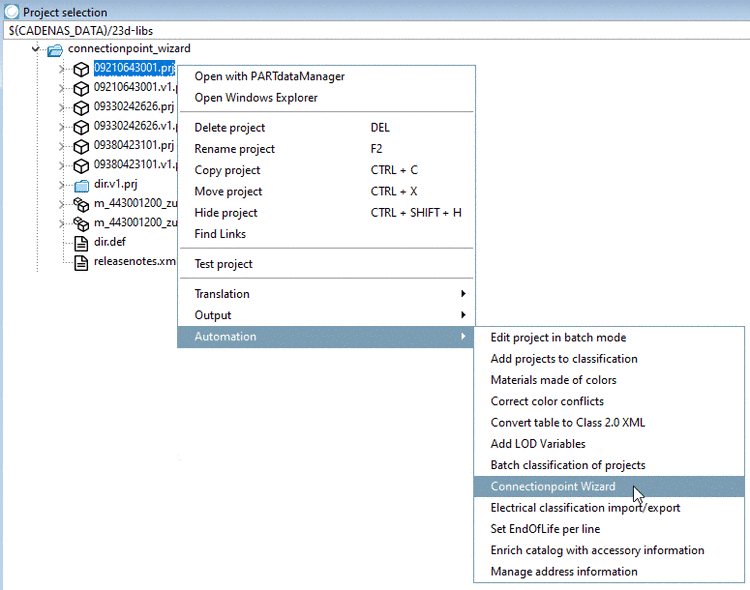
Select a project and call the wizard under Automation with the context menu command Connectionpoint Wizard.
-> Under Parts, only this one project is displayed.
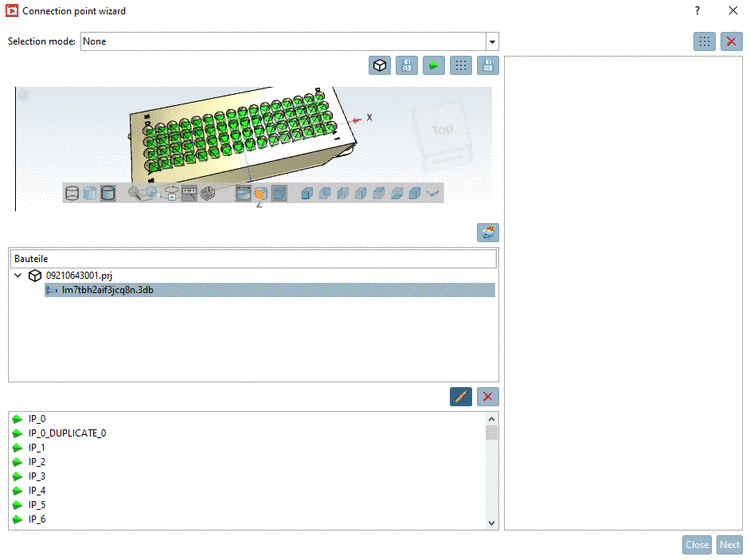
Details can be found under Section 5.12.12.16.1, “ Connectionpoint Wizard ” in eCATALOGsolutions Manual.
Precondition to be
able to use this function and for the context menu command to be displayed
is that the files cpwizard.cfg and cpwizard.vbb do exist under
$CADENAS/libs/all/plugins.