会社案内及び グループ企業の案内等
部品メーカー向け次世代型3Dビジュアル検索エンジン
製品及びソリューションのサポートページへはこちらから
無料で3D CADモデルを3Dfinditからダウンロード
製品・サービスについてのお問合せは こちらから
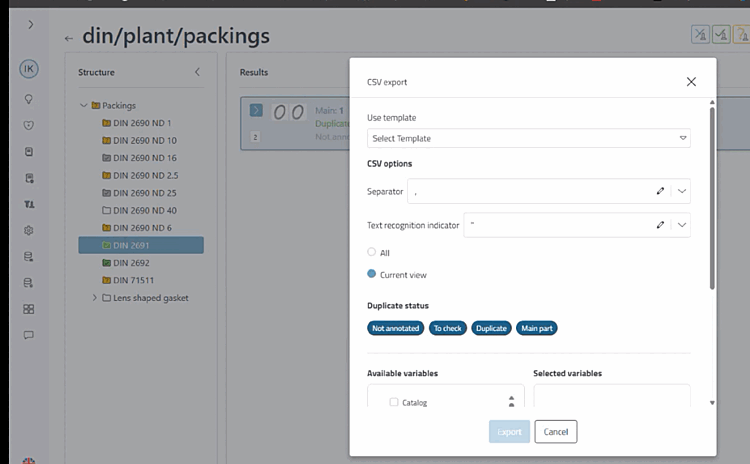
Select template (works in exactly the same way as for report templates)
Selecting a template fills the form with the values specified in the template.
Exports can not only be carried out manually, but also via an export task. A template is selected, which is determined here.
Templates can be deleted using the recycle bin icon next to the name.
Create template: It is mandatory to assign a name. Then click on Save template.
CSV options: Specify separators and text identifiers.
Various filter options:
Filter: All or Current view
Duplicate Status: Not annotated, To check, Duplicate or Main part
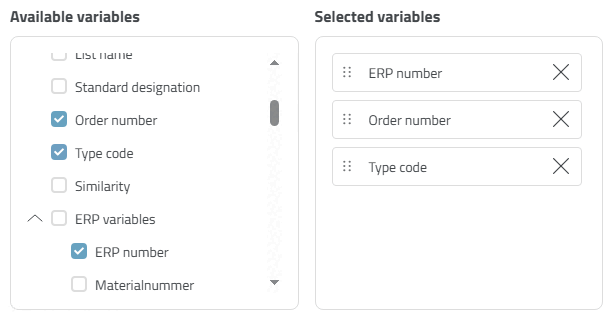
Available variables / Selected variables: All available variables are displayed.
Select a single variable or a group of variables. The selected variables are then displayed in the right-hand window area.
Export: Starts the generation of the CSV file on the server
Cancel: Closes the dialog


![[Note]](https://webapi.partcommunity.com/service/help/latest/pages/jp/partsolutions_user/doc/images/note.png)