

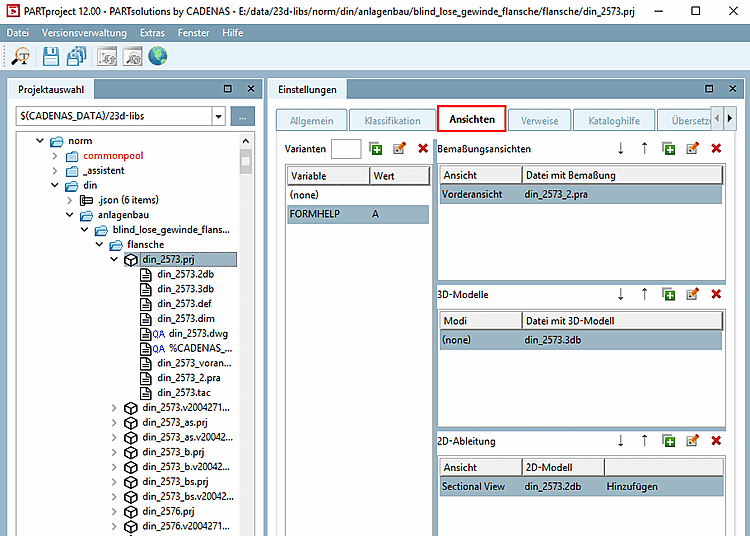
The Views tab page appears for the 3D [3D project] project type [Project type].
![[Note]](https://webapi.partcommunity.com/service/help/latest/pages/jp/partsolutions_user/doc/images/note.png) | Note |
|---|---|
Information for existing customers: With V12, the contents of the 3D project and 2D derivation tab pages have been merged on the new Views tab page. | |
The Views tab page contains the following dialog areas:
Here, create variants which are controlled via table.
For example, different table rows can have assigned different 3D models (3db files).
Or a value range variable controls the LOD, for example (see Section 5.8.2.1.20.14, “ Add LOD Variables ”).
If no variants are created or there is no access to any, the default row "(none)" is used.
Specify dimension views (.pra, .bmp, .tif ) here that are to be displayed later in the PARTdataManager technical views [Technical views] docking window.
Specify the 3D model(s) (.3db) that are to be displayed later in the PARTdataManager are to be displayed later.
It is controlled via the characteristic attribute table, which uses the variables created under variants [Variants].
Define 2D derivations here that are to be displayed later in the PARTdataManager 2D derivations to be displayed later in the 2D derivation docking window.