4.5.3.3. Overview of Multi-Site Installation
4.5.3.3.3. Single Port
Deployment (with WebSocket tunneling + cache server) |  |
| Prev | Next |
The cache server caches the 3Dfdindit website and RFS2.
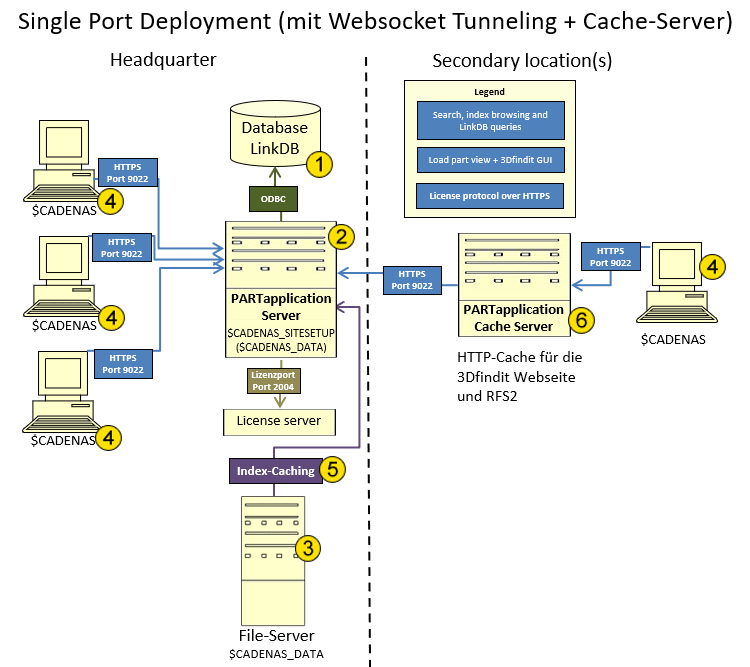
Below you will find explanations and additional links regarding the individual components and processes shown in the diagram:

|
The PARTsolutions Link Database (LinkDB) is set up as a new database on an existing database server. No new software is required on the database server . |

|
For the PARTapplicationServer, a separate server or virtual machine is recommended. Specific reasons for this include:
A single central application server for all locations is sufficient. All clients retrieve the detailed data for search results from a central $CADENAS_DATA file server. It makes sense to then also install the CADENAS license service on this server. See FLM Server Installation - Requesting/Importing Licenses. |

| |

|
$CADENAS on Clients (PARTsolutions software and interfaces) Software Distribution / Software Updates Deployment: An image created by an administrator or consultant can be distributed to clients via Copy or Share. Only the files are copied; system entries are not included. Any number of copies can be created.
|

|
To ensure that the PARTapplicationServer runs efficiently, we recommend caching the CADENAS_DATA index files. |

|
Using a caching server for the application server improves performance in distributed environments with multiple locations and high network latencies, particularly in internationally distributed installations. For more details, see " Section 1.4.5.5, “AppServer Cache for AppServer” in ENTERPRISE 3Dfindit (Professional) - Administration. |