
2.7.3.8.3. Delete Nodes and Remove Layers

Purpose

You can remove an obsolete blank space or eliminate an unnecessary inner hierarchy level. The option available in the node menu depends on whether the node has child nodes.

Requirements

  • Log in using clustering-view and clustering-edit.

  • Open a closed cluster using a suitable empty node or an inner node whose hierarchy level is no longer relevant.

  • Decide whether you want to permanently delete them or keep the direct child nodes and remove only their parent level .

Procedure

Check the node's [1] context menu to see which action is available for removal . A blank sheet or a group without child nodes offers "Delete". An inner node with child nodes offers “Remove level” instead.

The menu labels the operation in a way that corresponds to the current node structure, thereby preventing any misleading deletion actions.

The menu labels the operation in a way that corresponds to the current node structure, thereby preventing any misleading deletion actions.

"Delete" opens a confirmation dialog explaining the permanent removal of a suitable empty node [1]. "Remove level" opens another confirmation dialog [2]: The selected node is removed, and its direct child nodes move up one level to become children of the previous parent node.
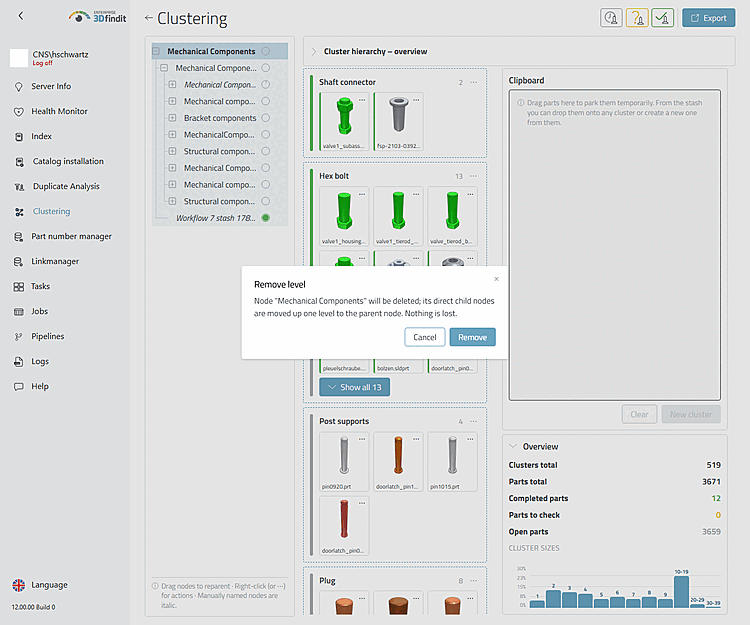
This confirmation distinguishes permanent deletion from removing a layer, in which case the direct child nodes are retained.

This confirmation distinguishes permanent deletion from removing a layer, in which case the direct child nodes are retained.

After confirmation, the result is reloaded with the parent node as the selection. A deleted empty node no longer appears . After removing a level, the previous child nodes appear under the former parent node and retain their deeper levels and their sub-assembly membership.
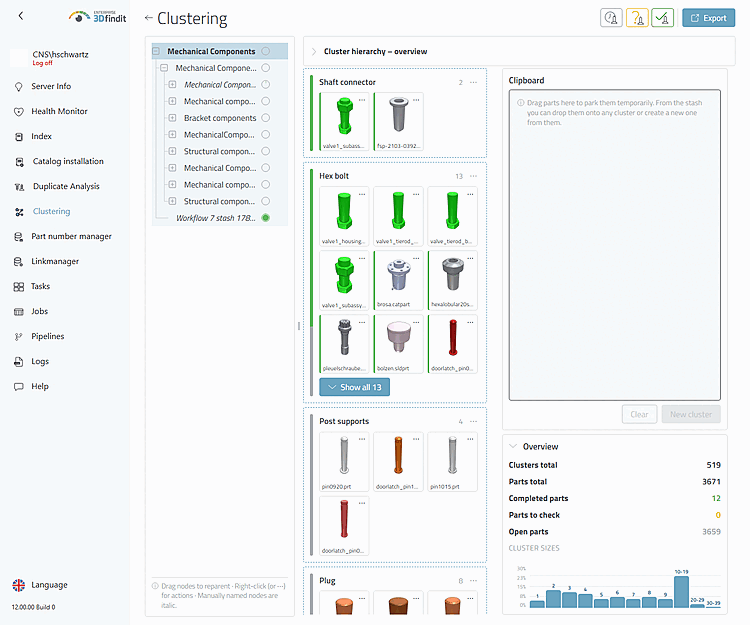
The updated tree shows the remaining hierarchy after the removal was saved .

The updated tree shows the remaining hierarchy after the removal was saved .

After each removal, check the progress circle in the tree (including its tooltip), the status bars of the remaining cluster cards, and the totals under "Overview." Deleting an empty node or removing an inner level must not change the number of parts or the totals for “Open,” “To check,” and “Done”; the displayed metrics must match the remaining hierarchy.

Options and Decisions in Operations

Removing Nodes – Delete, Remove Layer, and Prerequisites

Control element or State

Operating Instructions

"Delete"

Permanently removes a suitable node with no child nodes. Use this action only for an empty leaf node or an unused group with no child nodes.

"Remove level"

Removes an inner node with child nodes and attaches them directly to the previous parent node. Use this action to remove a level without deleting the child branches.

Confirmation of Deletion

Explains the consequences for the structure and contains the final command. Read the specified node and process before continuing.

"Cancel"

Closes the confirmation without changing the saved hierarchy.

Filled sheet

Cannot be deleted via this menu because it contains parts. Move the parts using the part assignment process before deleting an empty slot .

Root knot

Does not allow you to rename, move, delete, or remove the layer.

Key Figures

After deleting or removing a level, compare the progress circle in the tree (including the tooltip), the status bars of the remaining cluster maps, and “Overview.” Changes to empty nodes and hierarchy levels must not alter the sums of the parts or the validation status.

Result

The obsolete empty node is removed, or the unnecessary level is removed and its direct child nodes are placed under the previous parent node. The workspace selects the parent node and reloads the tree and result data accordingly .

Tips and Troubleshooting

  • "Remove level" does not merge child nodes and does not discard any parts.

  • After an operation error, the newly loaded server state takes precedence; do not assume that an unconfirmed local tree change has been saved.