会社案内及び グループ企業の案内等
部品メーカー向け次世代型3Dビジュアル検索エンジン
製品及びソリューションのサポートページへはこちらから
無料で3D CADモデルを3Dfinditからダウンロード
製品・サービスについてのお問合せは こちらから
In the Classifications category you will find the components classified according to many different classifications:
Classifications at a glance
Nach Alphabet
Click on By alphabet.
Click on the initial letter of your choice.
--> Now those catalogs are displayed whose name begins with the selected initial letter.
Now select the desired catalog.
Classification: By Alphabet
Nach Kategorien
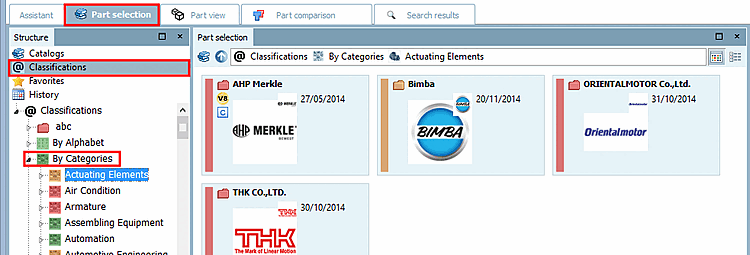
Click on By categories.
Select a category.
--> Only those catalogs are shown which contain parts in the selected category.
Classification: By category
Nach Ländern
Click on By country.
Click on the country of your choice.
--> Only catalogs are shown which deliver parts for the country you selected.
Select the desired catalog.
Classification: By country
Further classifications [Classifications]:
CIBSE PDT
ECLASS 4.1, 5.0 (SP1), 5.1, 6.0, 6.1, 6.2, 7.0, 7.1, 8.0, 8.1, 9.0, 9.1, 10.0
ETIM 4.0
FSF
ICS
IFC4
OmniClass
OmniClass 2006
Standards
Uniclass2015
UNSPSC
Own classifications
As soon as you click on a directory level in the directory tree, the directories of the next lower level are displayed on the right under Symbols or Details.