Previously, reports could be exported as a file in the dashboard on the Pipelines tab page using the button.

Now as of V12 reports can be automatically exported as file or be sent as e-mail.
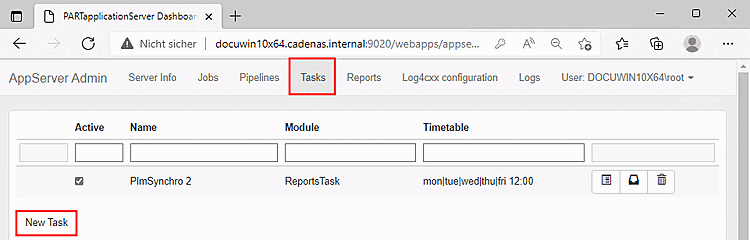
Open the Tasks tab page in the dashboard and click on the button.
-> The Task details dialog area is displayed below.
Assign a name under Name and select the new option ReportsTask in the list field under Module.
Select the individual options in the Settings dialog area:
Pipeline: In the list box, select either a specific pipeline for which reports are to be saved or the "All" option for all pipelines.
Export as CSV file: If activated, the reports are exported (as under Dashboard -> [see above]). A path must be specified under Save path.
Save path: Save path for the CSV file (The task is executed in the app server. Make sure that the path is available on the app server!
Send as e-mail: When activated, the reports are sent as an e-mail.
In this case, the server, etc. must be configured under
$CADENAS_SETUP/reportstask.cfgmust be configured.SMTP authentication is always possible, SSMTP should also be possible.
If only Send as E-Mail is selected, an e-mail with so-called inline html is sent (simple table).
If Send Html as attachment is also selected, the content is not sent directly in the email, but the website is sent as an attachment. HTML as attachment supports more CSS / HTML and therefore looks a little better. The content is structured with indentations and page numbering is possible.
E-mail addresses: Comma-separated list of e-mail addresses that are to be notified of new reports.
Send CSV file as attachment: Attach CSV file to e-mail instead of sending an HTML e-mail.
Report selection: Determine whether all reports or only the new reports from the last 24 hours should be sent. In the second case, repeat the execution every 24 hours.