

The automatic check for software updates can be activated or deactivated under Tools menu [Extras] → Settings... → Update notification > Activate automatic update notification on or off (activated by default).
!["Activate automatic update notification [Activate automatic update notification] " option](https://webapi.partcommunity.com/service/help/latest/pages/jp/installation_ecatalogsolutions/doc/resources/img/img_3f24d51aac644ced84ea5ff3177ad126.png)
Enterprise 3Dfindit (Professional) and eCATALOG 3Dfindit customers are informed about new releases by means of update notifications [Update notification]:

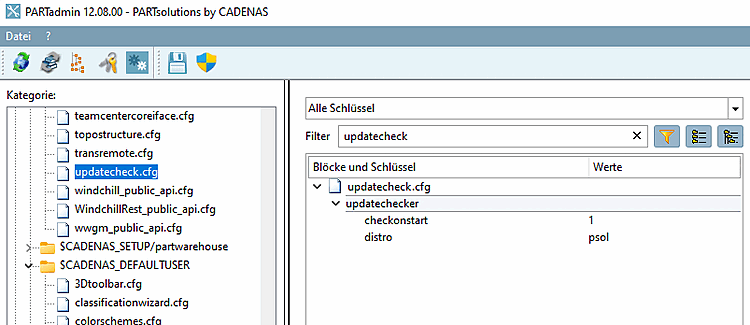
The setting is saved under $CADENAS_USERin the configuration file updatecheck.cfg, block updatechekcer, key checkonstart.
In the Help menu [Help] → menu item Check for update... menu item, you can perform a manual check at any time.
![Check for update [Check for update...]..](https://webapi.partcommunity.com/service/help/latest/pages/jp/installation_ecatalogsolutions/doc/resources/img/img_1c0f8041ae964b899cd554b8f5d163e9.png)
→ A corresponding message then appears.
![Example: "There is no newer version available [There is no new version available.]."](https://webapi.partcommunity.com/service/help/latest/pages/jp/installation_ecatalogsolutions/doc/resources/img/img_70d6f389655646bdabadba820fab55ac.png)