

To classify connection points, the CNS classification must be installed, but other classifications such as Revit or VDI 3805 may also be used.
Additional information such as placement information or meta information can be linked to geometric elements (connection points, coordinate system, sketch, plane).
Placement information: In particular, standard parts such as screws, nuts, etc. are provided with this information so that they can be placed quickly and easily in CAD using the placement dialog. See Section 5.12.10, “ Classify standard parts for placement dialog ”.
When searching for a suited electrical part, for example, advanced information like connection information in particular is needed. See Section 5.12.11, “Classify Electrical Parts ”.
In the piping classification the connection type can be defined, for example.
![[Important]](https://webapi.partcommunity.com/service/help/latest/pages/jp/installation_ecatalogsolutions/doc/images/important.png)
Two work areas are available for classifying connection points:
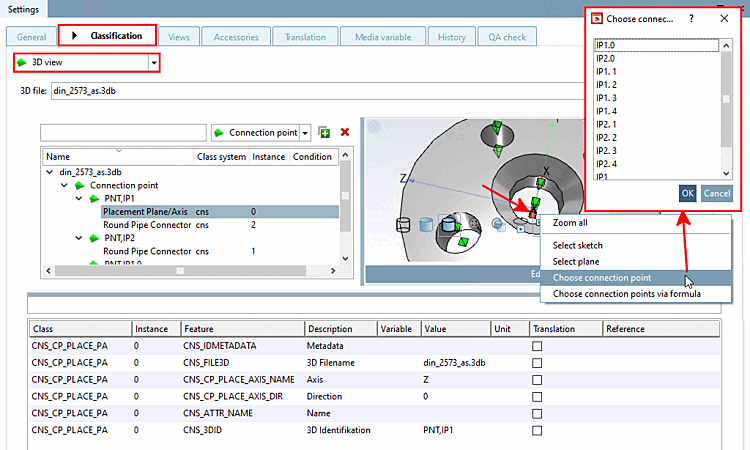
The 3D view list field selection is ideal for the initial assignment, as here you have a direct reference to the respective geometric elements such as connection points. See Section 5.12.5.1, “ Published elements - Select attachment point ”.
If the classes are already set, you can also select the desired classification in the list field (the following figure shows the selection of "@ CNS") and edit the individual characteristics. See also ???.
Settings -> Tabbed page Classification -> List field selection CNS -> Characteristics [Attributes] dialog area
![Settings -> Tabbed page Classification -> List field selection CNS -> Characteristics [Attributes] dialog area](https://webapi.partcommunity.com/service/help/latest/pages/jp/installation_ecatalogsolutions/doc/resources/img/img_16c42e3c4f6e400087693844dce478ce.png)