1.7.5.15.4.11.  Keys "TABCONTENT_..._ENABLED" and "TABCONTENT_..._HIDE_..." - Availability and visibility of tab contents

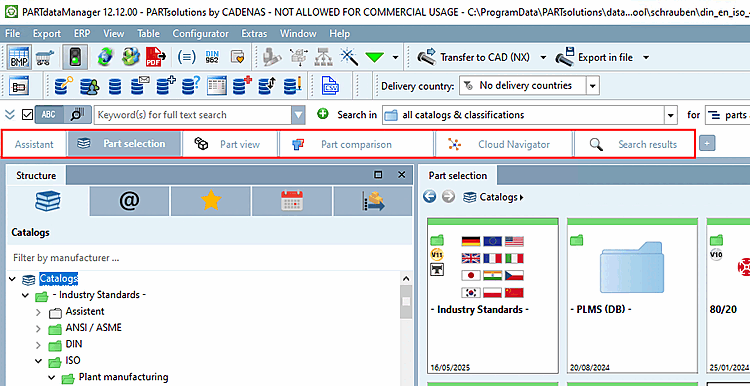
The keys beginning with "TABCONTENT..." control the availability or visibility of tabs in the PARTdataManager.

Availability of Content Sections:

  • Component comparison [Part comparison]: TABCONTENT_PARTCOMPARISON_ENABLED:

    • TRUE: available

    • FALSE: Not available

  • Cloud Navigator: TABCONTENT_CLOUDNAVIGATOR_ENABLED:

    • TRUE: available

    • FALSE: Not available

Visibility of available content areas after launch:

  • Assistant: TABCONTENT_ASSISTANT_HIDE_ON_STARTUP

    [Note]Note

    In order for the Assistant tab , the script must also setup\scripts\partdatamanager\autoexec\startuppage.vbb can be deactivated.

  • Part selection: TABCONTENT_PARTSELECTION_HIDE_ON_STARTUP

    • TRUE: not visible

    • FALSE: visible

  • Part view: TABCONTENT_PARTVIEW_HIDE_ON_STARTUP

    • TRUE: not visible

    • FALSE: visible

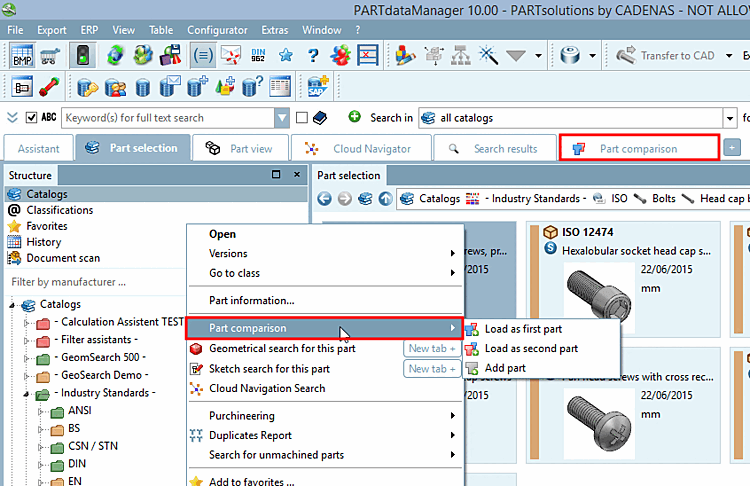
  • Component comparison [Part comparison]: TABCONTENT_PARTCOMPARISON_HIDE_ON_STARTUP

    When the tab is hidden, the context menus are, of course, hidden as well.

    When the tab is hidden, the context menus are, of course, hidden as well.

    • TRUE: not visible

    • FALSE: visible

  • Cloud Navigator: TABCONTENT_CLOUDNAVIGATOR_HIDE_ON_STARTUP

    • TRUE: not visible

    • FALSE: visible

  • Search result: TABCONTENT_SEARCHRESULT_HIDE_ON_STARTUP

    • TRUE: not visible

    • FALSE: visible