
1.7.6. Geometric Classification of Products in the
Pipeline
1.7.6.3. Set up a pipeline with the node |  |
| Prev | Next |
The node is located in the pipeline between the conversion and the structure node [Structure Node]:
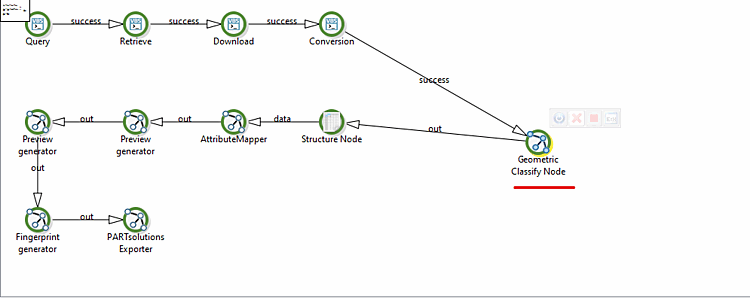
Insert the "Geometric Classify Node" from Available Filters [Available filters] before the structure node [Structure Node] in the pipeline.
In the structure node [Structure Node], set the document path [Document Path] to:
$IMPORT_PATH
This causes the parts to be stored in the directory determined by the node.
Optional: If you want to indicate in the link database which parts of the path were defined by this node, insert an "Attribute Mapper [AttributeMapper] " node after the structure node [Structure Node]. There, map the
NEW_PARTattribute of thepdmclassification to the desired field in the link database.