
5.12.11.13. ECAD assemblies - Control cabinets
5.12.11.13.2. Scope of validity of classifications in the context of assemblies |  |
| Prev | Next |
In principle, an individual component cannot know in which context it will later be installed in an enclosure. A door may well be the left-hand door in an enclosure (Component Function 3D = "Door left"), while "Component Function 3D = 'Door'" applies to another enclosure with only one door. There are different methods in the CNS system for dealing with these difficulties. In the most general case, a complete set of classifications must be defined in each component for each enclosure configuration. This means that the corresponding door project contains at least two sets of classifications, which must be selected via conditions for the respective use case. This procedure can only be recommended in certain exceptional cases. Under certain circumstances, it makes more sense to duplicate the door project for the two use cases and classify them differently.
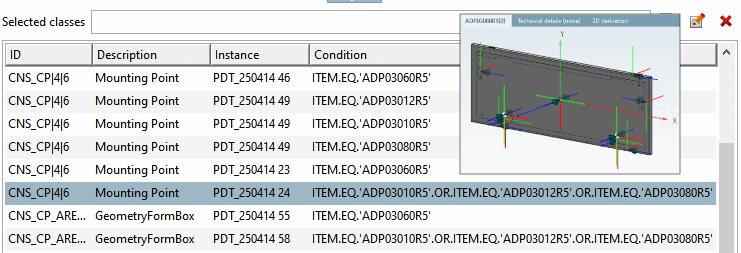
Enclosure door with article number "ADPXYZ": The conditions select different sets of classifications depending on the selected article number (here mounting points).
As a rule, the PDT import will make heavy use of conditions (see image above). Using this method, the different use cases of a given part (different types of installation) can be controlled quite flexibly. Ideally, these considerations are already taken into account when creating the catalog so that conditions can be reduced to a minimum.