

In the
In the upper right corner of the catalog thumbnail, informative standard icons can be displayed.
, for example, "Catalog Excerpt"  or "2D"
 .
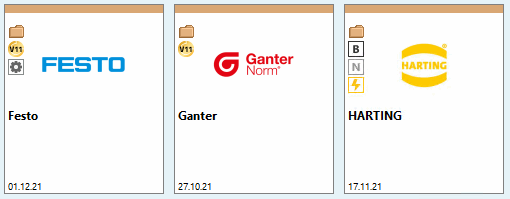
 C = Customer Catalog: The catalog was created by the
Manufacturer created by himself (not by CADENAS)
 B = BMEcat Catalog: The catalog has been updated via
created the electronic exchange format BMEcat
 N = Neutral Catalog / Quick & Simple Catalog:
PARTproject -> context menu of the
Index Tree > Automation
-> Import neutral formats in batch run (Quick and
Simple) [Batch import neutral formats (Quick and Simple)]
 I = Internal Catalog: The catalog is only
used internally at the customer


The following section explains a configuration:
In the
Configuration file catalogicons.cfg name and location
icons.
Default Location
of icons: C:\ProgramData\cadenas\partsolutions\setup/bitmaps/catalog_icons
[TEXT] CUSTOMER=Kundenkatalog 2D=2D-Katalog EXCERPT=Katalogauszug [ICONS] CUSTOMER=C:\ProgramData\cadenas\partsolutions\setup/bitmaps/catalog_icons/catalog_icon_customer.png 2D=C:\ProgramData\cadenas\partsolutions\setup/bitmaps/catalog_icons/catalog_icon_2d.png EXCERPT=C:\ProgramData\cadenas\partsolutions\setup/bitmaps/catalog_icons/
In the
catalogicons.cfg you can look up where
these icons are located and what they are called.
The "dir.prj" file at the top-level directory specifies the icons to be displayed.
ICONS=EXCERPT
ICONS=2D
The icons can also be located in the local catalog directory. In this case, the configuration file catalogicons.cfg is not used.
ICONS=MY_ICON
ICON(MY_ICON)=catalog_icon_customer.png
ICONTEXT(MY_ICON)=My Text