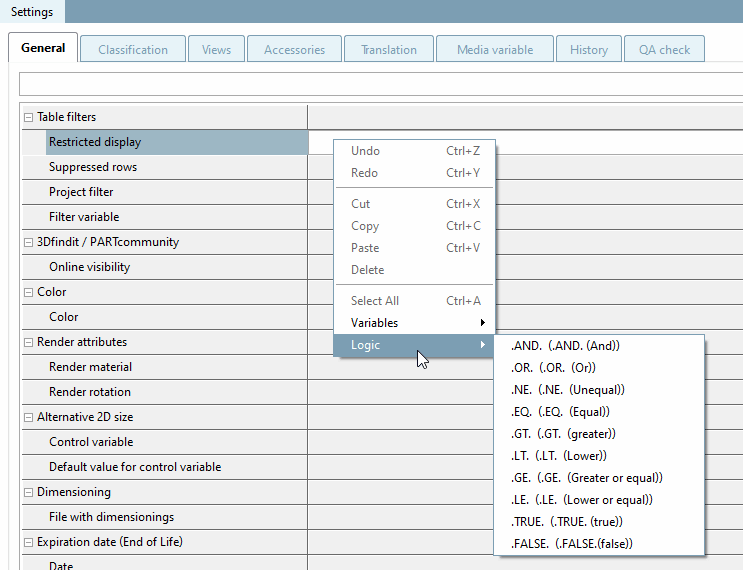
Insert
for example, in the field the condition "D.EQ.8"
to reduce the table display to these values (see
following figure). You can right-click > add different operators to the logic [Logic] , or
write them themselves. A more complex syntax is also possible (e.g.
"D.NE.14.AND.D.NE.16.AND.D.NE.18"). Read
To do this, Section 7.8.12, “
Attribute algorithms
”.
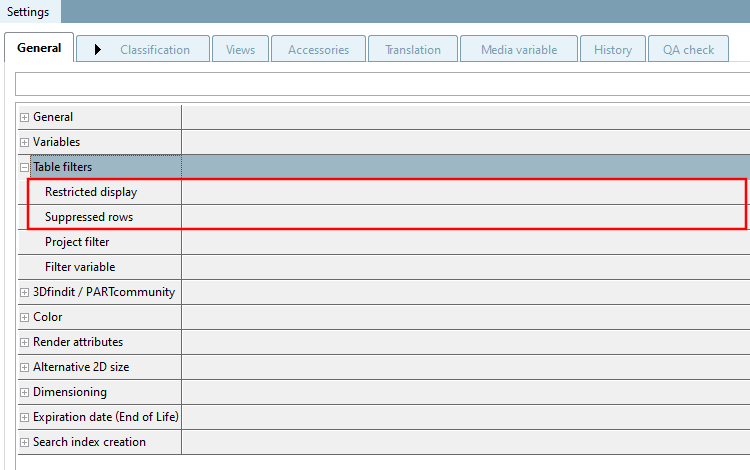
![Table restriction [Restricted display] with D.EQ.8](https://webapi.partcommunity.com/service/help/latest/pages/jp/ecatalogsolutions/doc/resources/img/img_c35a3415271a415897d523e40cc809e6.png)
![[Note]](https://webapi.partcommunity.com/service/help/latest/pages/jp/ecatalogsolutions/doc/images/note.png) | Note |
|---|---|
Table restriction [Restricted display] and row suppression [Suppressed rows] can be better implemented with the Strategic Parts Management methods if ERP functionality is available (see e.g. Section 5.7.5.1.4, “ Display condition for table rows - plinkgroups.cfg -> Block [Role_name] -> Key "TABRESTRICTION" ” in ENTERPRISE 3Dfindit (Professional) - Administration" Section 5.7.5.1.4, “ Display condition for table rows - plinkgroups.cfg -> Block [Role_name] -> Key "TABRESTRICTION" ” in ENTERPRISE 3Dfindit (Professional) - Administration ). The
Restrictions from table restriction [Restricted display] and row suppression [Suppressed rows] are fixed - in contrast to
to the preferred series function | |