circle tangentially to 3 elements
(Circle/Line/Arc): [Circle tangential to 3 elements (circle/line/arc)] Create a circle based on the
Selection of three of the same elements.
circle tangentially to 3 elements
(Circle/Line/Arc): [Circle tangential to 3 elements (circle/line/arc)] Create a circle based on the
Selection of three of the same elements.
![[Note]](https://webapi.partcommunity.com/service/help/latest/pages/jp/ecatalogsolutions/doc/images/note.png) | Note |
|---|---|
This feature is only officially available for future versions and is only an internal test version with V12.13 and is therefore hidden in the standard version. | |
In the toolbar, select Circle tangential to 3 elements (circle/line/arc).
Click on the three elements of the same type that are to be used to create the circle, one after the other.
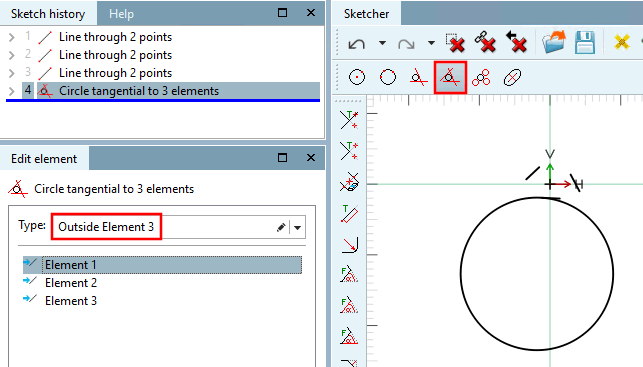
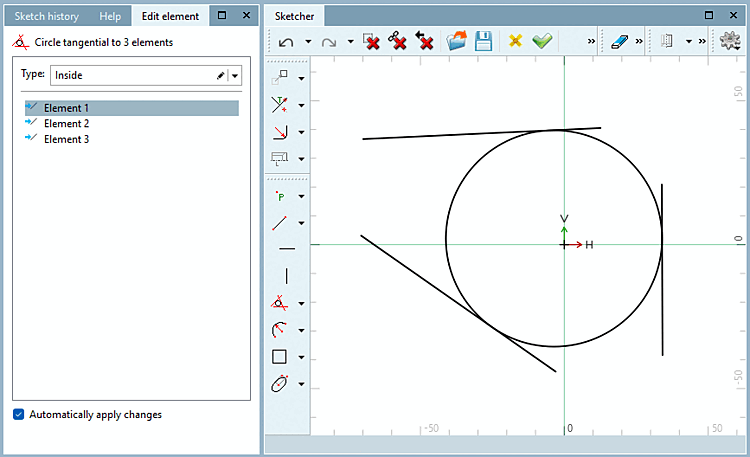
The circle is created. You can still select the type [Type] in the Edit element window if required.
Type inside: The circle is inside the triangle formed by the three lines (even if the lines are not visibly touching).
Type outside: The circle is now on the other side of the selected element (but still touches the extensions of the other two lines).
![[Important]](https://webapi.partcommunity.com/service/help/latest/pages/jp/ecatalogsolutions/doc/images/important.png)