

When loading the PARTdesigner table, the original language is always loaded by default (which is usually English). This table column contains the data that was entered directly during the modeling process and is therefore always available, even if no translations have been created yet.
![PARTproject > Tabbed page "Settings [Settings]" > Tabbed page "Translation [Translation]": At "No" there is no entry for "english" yet.](https://webapi.partcommunity.com/service/help/latest/pages/jp/ecatalogsolutions/doc/resources/img/img_b7931ee94ec6465d9341219309baed58.png)
PARTproject > Tabbed page "Settings [Settings]" > Tabbed page "Translation [Translation]": At "No" there is no entry for "english" yet.
When loading the table, the Show display data [Display viewdata] button is deactivated; this means that selecting a different language in the list field is ineffective.
![Button "Show display data [Display viewdata]" deactivated](https://webapi.partcommunity.com/service/help/latest/pages/jp/ecatalogsolutions/doc/resources/img/img_b043095a2a534e0abcb951810f2932d5.png)
If you use the
To display table data in another language, activate the
First, click the  Show Display Data [Display viewdata] button
and then select the desired one from the list box of the language selector
Language.
Show Display Data [Display viewdata] button
and then select the desired one from the list box of the language selector
Language.
The function of the
Show buttons  display data [Display viewdata]
is the switching between the display of internal value ( original language) and the value of a
Translation language.
display data [Display viewdata]
is the switching between the display of internal value ( original language) and the value of a
Translation language.
Whether anything changes when switching depends on the data:
Variable with fixed, textual value: If translation exists, the language selected in the list field is displayed ("Original" is the internal value).
Value range variable with naming: Either internal value or visible translated text
Button
 display data
Show [Display viewdata]
Disabled: It will be
the internal value is displayed. In the following example illustration
this is 0 or 1 for variable "MIF".
display data
Show [Display viewdata]
Disabled: It will be
the internal value is displayed. In the following example illustration
this is 0 or 1 for variable "MIF".
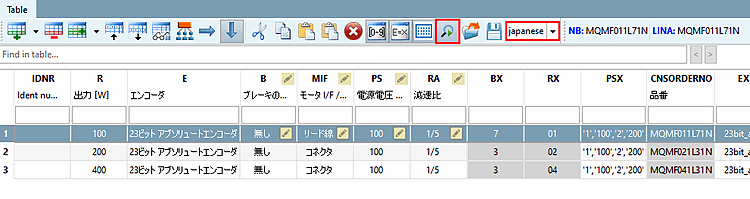
Button "Show display data [Display viewdata]" deactivated and language "Original" automatically selected when loading
Button
display data
Show enabled [Display viewdata]
: It will be
the naming is displayed. In the following exemplary figure,
this is the case with the variable "MIF", "Connector" or "Lead wire". Exist
translations for "Connector" or "Lead wire", these are
according to the selection in the language list box.
![Button "Show display data [Display viewdata]" deactivated and language "Original" automatically selected when loading](https://webapi.partcommunity.com/service/help/latest/pages/jp/ecatalogsolutions/doc/resources/img/img_922411b7dfe44946adee8356376a62dd.png)
!["Show display data [Display viewdata]" button activated and "Japanese" language selected](https://webapi.partcommunity.com/service/help/latest/pages/jp/ecatalogsolutions/doc/resources/img/img_4f4353a6f1d14a918debdd4de9b551e6.png)