

 | Tip |
|---|---|
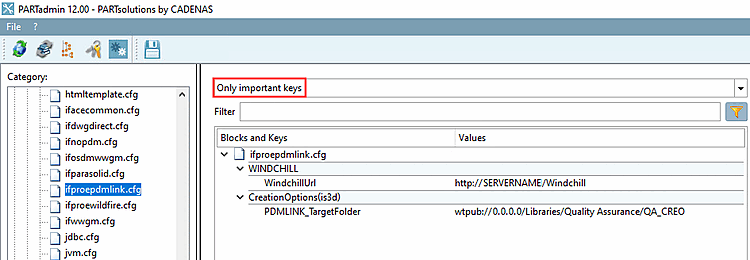
The most important keys are displayed when you search for the keyword "Simple" in the configuration file or filter by " Important Keys Only [Only important keys] " in PARTadmin.
| |
The
PDMLink-specific settings can be configured under
$CADEANS_SETUP/ifproepdmlink.cfg.
URL to the Windchill server: Block [WINDCHILL] -> Key "WindchillUrl". (Must match the URL set in the dialog described above.)
Check-in folder on the server: Block [CreationOptions(is3d)] -> Key "PDMLINK_TargetFolder".
Use this option to specify the server on which check-ins should take place. Enter the full path, including the folders. The path must be specified as follows:
wtpub://<Server Name>/<Products, Libraries, Projects,...>/<Context Name>/<Folder>
PDMLINK_TargetFolder=wtpub://192.168.1.216/Libraries/Lib1/SubFolderLib1
